Tables
table_settings, explained visually
Every key in table_settings changes one step of the table finder. Below, each option is shown on a table drawn with exactly the defect it fixes, with the default result next to the fixed one.
Short answer
Pass a dictionary to any table method. Only the keys you set change; everything else keeps its default:
import pdfplumber

with pdfplumber.open("samples/bank-statement.pdf") as pdf:
    page = pdf.pages[0]
    table = page.extract_table({
        "vertical_strategy": "text",      # columns from aligned words, not lines
        "horizontal_strategy": "lines",   # rows from drawn rules
        "snap_tolerance": 4,
    })

print(len(table), "rows x", len(table[0]), "columns; header:", table[0])22 rows x 6 columns; header: ['Date', 'Description', '', 'Debit', 'Credit', 'Balance']On this statement, the text strategy finds one column too many (the empty third header): settings change how tables are found, not whether the result is right, so check it. The borderless guide shows the reliable fix.
The defaults, printed from pdfplumber 0.11.10 itself:
from dataclasses import asdict
from pdfplumber.table import TableSettings

for key, value in asdict(TableSettings()).items():
print(f"{key:28} {value!r}")vertical_strategy 'lines'
horizontal_strategy 'lines'
explicit_vertical_lines None
explicit_horizontal_lines None
snap_tolerance 3
snap_x_tolerance 3
snap_y_tolerance 3
join_tolerance 3
join_x_tolerance 3
join_y_tolerance 3
edge_min_length 3
edge_min_length_prefilter 1
min_words_vertical 3
min_words_horizontal 1
intersection_tolerance 3
intersection_x_tolerance 3
intersection_y_tolerance 3
text_settings {'x_tolerance': 3, 'y_tolerance': 3}Where each setting acts
The table finder runs four steps (explained on extract tables). Most settings act in one step; the text_* options act in two:
| Step | Settings |
|---|---|
| 1. Collect edges | vertical_strategy, horizontal_strategy, explicit_vertical_lines, explicit_horizontal_lines, edge_min_length_prefilter, min_words_vertical, min_words_horizontal, text_* |
| 2. Clean up edges | snap_tolerance (snap_x_ / snap_y_), join_tolerance (join_x_ / join_y_), edge_min_length |
| 3. Find intersections | intersection_tolerance (intersection_x_ / intersection_y_) |
| 4. Read cell text | text_* (passed to the word extractor), e.g. text_x_tolerance |
When a table comes out wrong, look at the debug picture first (page.to_image().debug_tablefinder(settings)) and ask which step failed: missing edges, edges that do not meet, or text read badly.
import pdfplumber

with pdfplumber.open("samples/invoice.pdf") as pdf:
    finder = pdf.pages[0].debug_tablefinder()   # same settings dict as find_tables()

print(len(finder.edges), "edges")
print(len(finder.intersections), "intersections")
print(len(finder.cells), "cells")
print(len(finder.tables), "table(s)")
print("first edge:", {k: finder.edges[0][k] for k in ("orientation", "x0", "top", "x1", "bottom")})15 edges
54 intersections
40 cells
1 table(s)
first edge: {'orientation': 'h', 'x0': 54.0, 'top': 250.0, 'x1': 558.0, 'bottom': 250.0}Strategies
vertical_strategy and horizontal_strategy choose where edges come from, independently for each direction.
| Strategy | Edges come from | Use when |
|---|---|---|
"lines" (default) |
drawn lines and the sides of rectangles and curves | the table is ruled or drawn with cell boxes |
"lines_strict" |
drawn lines only; rectangle and curve sides are ignored | shaded backgrounds or decorative boxes create false cells |
"text" |
words that line up: shared left edges, right edges or centres for columns; each text line’s top and bottom for rows | there are no lines in that direction |
"explicit" |
only the lines you list in explicit_vertical_lines / explicit_horizontal_lines |
you know where the boundaries are |
A table with no lines at all needs "text" (or "explicit") in both directions. Crop to the table first, otherwise headings and footnotes join in:
import pdfplumber

with pdfplumber.open("samples/borderless-table.pdf") as pdf:
    page = pdf.pages[0]
    print("lines strategy:", page.extract_table())

    table_area = page.crop((50, 118, 590, 250))   # keep the title and footnote out
    settings = {"vertical_strategy": "text", "horizontal_strategy": "text"}
    for row in table_area.extract_table(settings)[:4]:
print(row)lines strategy: None
['Segment Q', '1 2026 Q', '2 2026 Q', '3 2026 Change', 'Q/Q']
['', '', '', '', '']
['Industrial sensors', '12,480', '13,115', '14,002', '6.8%']
['', '', '', '', '']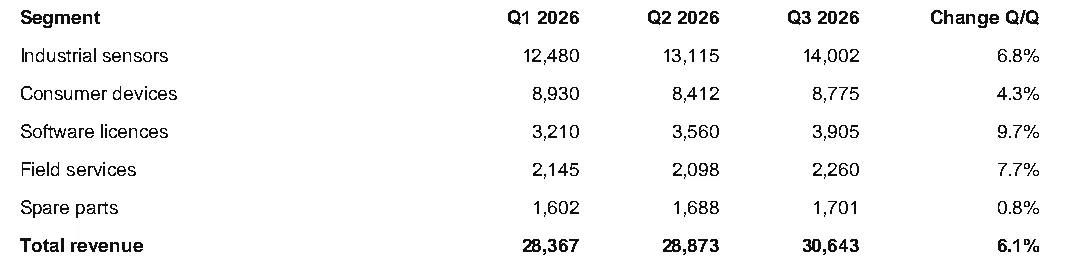
That result shows the text strategy’s two typical side effects: headers split where right-aligned numbers start, and blank rows between lines. The borderless tables guide has a recipe that matches this table exactly.
min_words_vertical and min_words_horizontal
With the text strategy, a column edge needs at least min_words_vertical (default 3) words aligned on it, and a row edge at least min_words_horizontal (default 1). Raise min_words_vertical to stop accidental alignments from becoming columns: on the bank statement, raising it to 5 removed the phantom column at x ≈ 180, but also dropped the header row from the table, and from 7 a real column disappears, so check the result.
Explicit lines
explicit_vertical_lines and explicit_horizontal_lines accept numbers (an x or y position; the line spans the whole page) or objects such as page.lines, page.rects or page.curves (their actual edges are used). Explicit lines are added to whatever the strategy found; with "explicit" they are the only edges in that direction, and you need at least two.
import pdfplumber

with pdfplumber.open("samples/bank-statement.pdf") as pdf:
    page = pdf.pages[0]
    names = ["Date", "Description", "Debit", "Credit", "Balance"]
    header = [w for w in page.extract_words() if w["text"] in names]
    columns = [header[0]["x0"] - 4]
    columns += [(a["x1"] + b["x0"]) / 2 for a, b in zip(header, header[1:])]
    columns += [header[-1]["x1"] + 4]

    settings = {
        "vertical_strategy": "explicit",
        "explicit_vertical_lines": columns,        # numbers: full-height lines
        "horizontal_strategy": "explicit",
        "explicit_horizontal_lines": page.lines,   # objects: the ruled lines as drawn
    }
    table = page.extract_table(settings)
    print(len(table), "rows")
    print(table[0])
print(table[1])23 rows
['Date', 'Description', 'Debit', 'Credit', 'Balance']
['2026-10-02', 'Pharmacy 24', '96.27', '', '2,353.73']Here the columns come from the header row and the rows from the ruled lines exactly as drawn. Adding one explicit line to "lines" is also the quick fix for a table that is missing its outer border.
snap_tolerance: misaligned rules
Lines that should be one column boundary are sometimes drawn a few points apart, typically when each row is drawn separately. snap_tolerance (default 3 pt) moves parallel edges that are this close onto a common position.
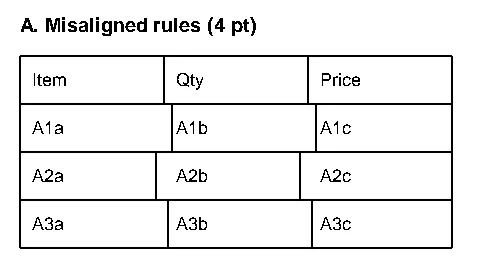
snap_x_tolerance and snap_y_tolerance set the vertical-line and horizontal-line snapping separately. Snapping too far merges real columns that are close together.
join_tolerance: broken lines
Rules are often drawn as several segments with small gaps, especially at the points where they cross other rules. join_tolerance (default 3 pt) joins collinear segments whose gap is no larger than this.
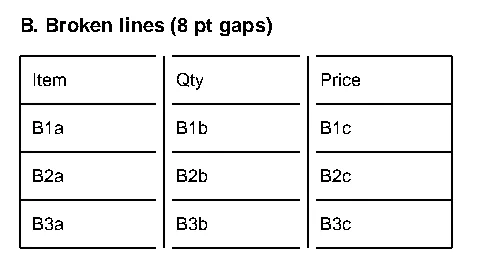
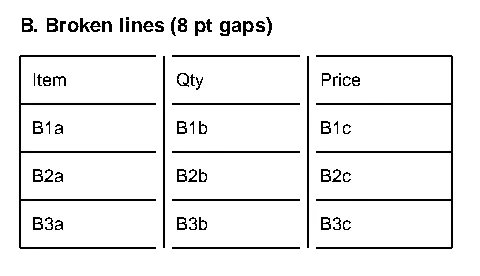
On this table, intersection_tolerance: 5 also works, because the segment ends are within 4 pt of the crossing lines. Joining is the more honest fix when the gaps are in the middle of a line rather than at crossings.
edge_min_length and edge_min_length_prefilter: short and dashed lines
Two length filters exist. edge_min_length_prefilter (default 1 pt, added in 0.11.8) drops tiny segments before snapping and joining. edge_min_length (default 3 pt) drops short edges after joining. Dashed or dotted rules drawn as many short segments fall foul of the first:
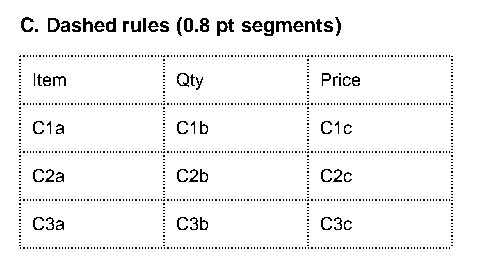
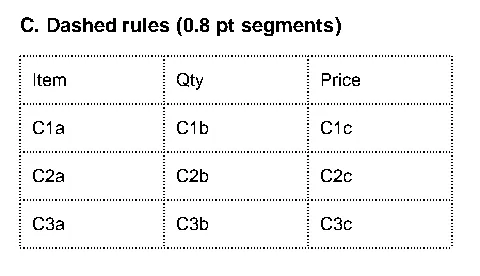
Raise edge_min_length instead when tick marks, underlines or chart axes produce stray edges that break a table into pieces.
intersection_tolerance: lines that stop short
An intersection needs a vertical and a horizontal edge to meet. intersection_tolerance (default 3 pt) lets them miss by up to this much.
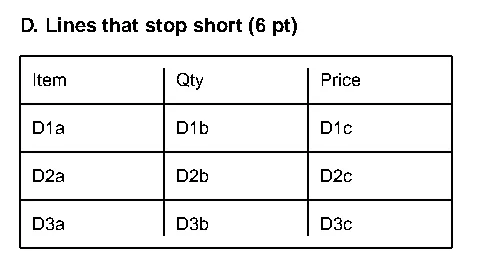
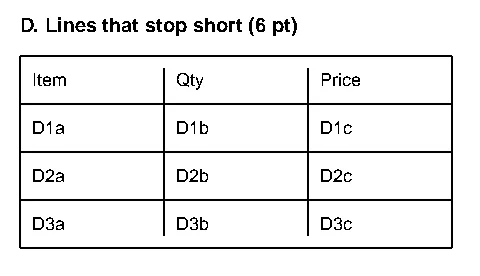
Here are all four cases, measured with the default settings and with the single change shown:
import pdfplumber

cases = {
    "A misaligned": ((50, 105, 290, 230), {"snap_tolerance": 5}),
    "B broken":     ((320, 105, 560, 230), {"join_tolerance": 9}),
    "C dashed":     ((50, 315, 290, 440), {"edge_min_length_prefilter": 0.5}),
    "D short":      ((320, 315, 560, 440), {"intersection_tolerance": 7}),
}

with pdfplumber.open("samples/imperfect-tables.pdf") as pdf:
    page = pdf.pages[0]
    for name, (bbox, fix) in cases.items():
        region = page.crop(bbox)
        for label, settings in [("default", {}), ("fixed", fix)]:
            table = region.find_table(settings)
            cells = len(table.cells) if table else 0
            header = table.extract()[0] if table else None
print(f"{name:13} {label:8} {cells:2} cells {header}")A misaligned default 12 cells ['Item', None, 'Qty', None, 'Price']
A misaligned fixed 12 cells ['Item', 'Qty', 'Price']
B broken default 0 cells None
B broken fixed 12 cells ['Item', 'Qty', 'Price']
C dashed default 0 cells None
C dashed fixed 12 cells ['Item', 'Qty', 'Price']
D short default 8 cells ['Item Qty Price', None, None]
D short fixed 12 cells ['Item', 'Qty', 'Price']Note case A: the default finds the right number of cells but the wrong shape (extra None columns). Always check the header row, not just whether a table was found.
text_* settings: how cell text is read
Any key starting with text_ is passed, without the prefix, to the word extractor used for the text strategy and for reading cell contents: text_x_tolerance, text_y_tolerance, text_x_tolerance_ratio, text_keep_blank_chars, text_use_text_flow, text_expand_ligatures, and so on. Use them when cell text has the problems described in extract text, such as merged words. text_tolerance sets both x and y at once.
Complete reference
| Key | Default | Unit | What it does |
|---|---|---|---|
vertical_strategy |
"lines" |
– | Where column edges come from: lines, lines_strict, text, explicit |
horizontal_strategy |
"lines" |
– | Where row edges come from |
explicit_vertical_lines |
None |
pt or objects | Extra vertical edges (x positions or objects) |
explicit_horizontal_lines |
None |
pt or objects | Extra horizontal edges (y positions or objects) |
snap_tolerance |
3 |
pt | Snap parallel edges within this distance to one position |
snap_x_tolerance, snap_y_tolerance |
3 |
pt | Snapping for vertical / horizontal edges separately |
join_tolerance |
3 |
pt | Join collinear segments separated by up to this gap |
join_x_tolerance, join_y_tolerance |
3 |
pt | Gaps along horizontal edges (x) / along vertical edges (y) |
edge_min_length_prefilter |
1 |
pt | Drop edges shorter than this before snapping and joining (0.11.8+) |
edge_min_length |
3 |
pt | Drop edges shorter than this after joining |
min_words_vertical |
3 |
words | Text strategy: aligned words needed for a column edge |
min_words_horizontal |
1 |
words | Text strategy: aligned words needed for a row edge |
intersection_tolerance |
3 |
pt | Max gap for a vertical and horizontal edge to count as crossing |
intersection_x_tolerance, intersection_y_tolerance |
3 |
pt | Same, per direction |
text_* |
x_tolerance=3, y_tolerance=3 |
– | Word-extraction options for the text strategy and cell text |
Negative values raise ValueError, and an unknown strategy name raises an error listing the four valid ones.
Try every setting live
The Table Settings Lab below runs the real pdfplumber in your browser. It starts on the tutorial’s bank statement: switch vertical_strategy to text and watch the phantom column appear, then tick Click the page to add explicit lines and click between the column headers instead. Open your own PDF with Open PDF; nothing is uploaded.
Table Settings Lab
Drop a PDF here or choose a sample above.
Text-based PDFs work best. Scanned pages have nothing for pdfplumber to read until OCR adds a text layer.
Text and objects
Run pdfplumber to see extract_text() for this page.
Table Settings Lab
Explicit lines: none
table_settings = # defaults
Run pdfplumber to detect tables.
Crop and coordinates
Drag a rectangle on the page. pdfplumber's coordinates are in points from the top-left corner: (x0, top, x1, bottom).
Drag a box on the page to measure it.
PDF Doctor
Checks why extraction might fail: missing text layer, (cid:x) fonts, duplicated characters, rotation and ruling lines.
The full-page version with page thumbnails is at /playground/.