Cookbook
Invoices
Invoices from one supplier share a layout, and that layout tells you where everything is. This recipe reads four invoices with one function: header fields by their labels, the address block, the line items and the totals. Then it checks the arithmetic, which is what turns an extractor you hope works into one you know works.
Short answer
import json
from decimal import Decimal
from pathlib import Path

import pdfplumber

def right_of(page, label):
    """Text on the same line as `label`, to its right."""
    hit = page.search(label, regex=False)[0]
    return page.crop((hit["x1"] + 1, hit["top"] - 2, page.width, hit["bottom"] + 2)).extract_text()

def money(text):
    return Decimal(text.replace(",", ""))

def read_invoice(path):
    with pdfplumber.open(path) as pdf:
        page = pdf.pages[0]
        table = page.find_table()
        label = page.search("BILL TO", regex=False)[0]
        address = page.crop((label["x0"], label["bottom"] + 1, 300, table.bbox[1])).extract_text()
        header, *rows = table.extract()
        tax = page.search(r"Tax \((.+?)\)")[0]
        return {
            "number": right_of(page, "Invoice no."),
            "issued": right_of(page, "Issue date"),
            "due": right_of(page, "Due date"),
            "po": right_of(page, "PO number"),
            "bill_to": address.splitlines(),
            "items": [dict(zip(["item", "description", "qty", "unit_price", "amount"], r)) for r in rows],
            "subtotal": money(right_of(page, "Subtotal")),
            "tax_rate": tax["groups"][0],
            "tax": money(right_of(page, tax["text"])),
            "total": money(right_of(page, "Total due (USD)")),
        }

def problems(inv):
    found = []
    for it in inv["items"]:
        if int(it["qty"]) * money(it["unit_price"]) != money(it["amount"]):
            found.append(f"{it['item']}: qty x price != amount")
    if sum(money(it["amount"]) for it in inv["items"]) != inv["subtotal"]:
        found.append("line items do not add up to the subtotal")
    if inv["subtotal"] + inv["tax"] != inv["total"]:
        found.append("subtotal + tax != total")
    return found

for path in ["samples/invoice.pdf", *sorted(Path("samples/invoices").glob("*.pdf"))]:
    inv = read_invoice(path)
    truth = json.load(open(Path("samples/truth") / Path(path).relative_to("samples").with_suffix(".json")))
    same = (inv["number"] == truth["fields"]["Invoice no."] and inv["bill_to"] == truth["bill_to"]
            and [list(it.values()) for it in inv["items"]] == truth["table"][1:] and str(inv["total"]) == truth["total"].replace(",", ""))
    print(f"{inv['number']}  {len(inv['items']):>2} items  tax {inv['tax_rate']:>5}  total {inv['total']:>8}"
f" checks: {problems(inv) or 'pass'} matches source: {same}")INV-2026-0417 7 items tax 8% total 1118.23 checks: pass matches source: True
INV-2026-0418 3 items tax 20% total 683.76 checks: pass matches source: True
INV-2026-0419 11 items tax 7.25% total 985.41 checks: pass matches source: True
INV-2026-0420 5 items tax 0% total 907.00 checks: pass matches source: TrueOne function reads all four invoices from this supplier: one with 3 line items, one with 11 and a five-line address, and tax rates from 0% to 20%. Every field matches the data the invoices were generated from, and every invoice passes the arithmetic checks.
The four PDFs are invoice.pdf and the three in samples/invoices/ (0419, 0420), with their source data as JSON in samples/truth/. All fictional and free to reuse.
Read fields by label, not by position
Plain extract_text() of an invoice interleaves the two header columns: billing@hollowpine.example Issue date 2026-10-03 comes out as one line, because the supplier’s address and the invoice details share the same heights on the page. Splitting that text with regular expressions works until an address has one line more.
The recipe uses positions instead. page.search() finds each label and gives its box; the value is whatever sits to its right on the same line. The boxes below are exactly the regions the code reads:
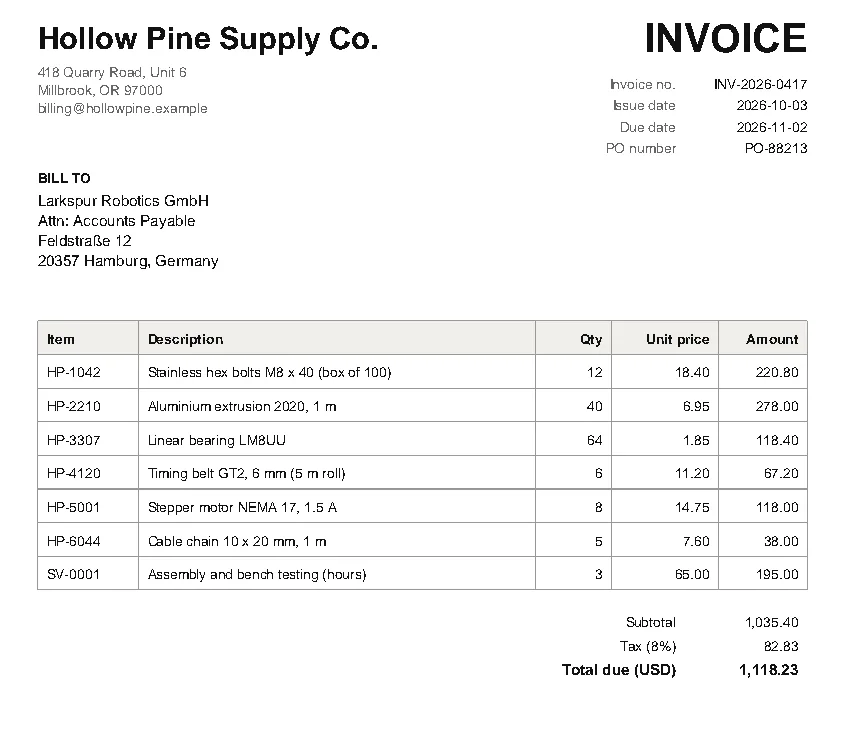
This survives longer addresses, more line items and moved blocks, because nothing is tied to a fixed coordinate. The address is the one region defined by two anchors: below the BILL TO label and above the table, so its height adapts to the number of address lines.
Line items and money
find_table() follows the invoice’s ruling lines, so the item table comes out without settings (how table detection works). Two details matter for money:
- Use
Decimal, notfloat.0.1 + 0.2 != 0.3in floating point, and a check like “items add up to the subtotal” fails on rounding noise.Decimal("1,035.40".replace(",", ""))is exact. - Keep the strings until you have checked them. Converting
"1.234,56"(European format) with the same rule gives a wrong number without an error. The export guide has a cleaner for the usual formats.
Labels that carry data need a pattern: the tax label is Tax (8%) on one invoice and Tax (7.25%) on another, so the recipe searches with a regular expression and reads the rate from the match’s group, then uses the matched text as the label for the amount.
Check the arithmetic
The problems() function verifies three things the invoice itself guarantees: each quantity times unit price equals the line amount, the amounts add up to the subtotal, and subtotal plus tax equals the total. None of them depends on the extraction code, so they catch extraction mistakes rather than repeating them.
Run them on every invoice, store the result with the data, and send failures to a person. For born-digital invoices from a known layout, failures are rare and usually mean the layout changed.
Scanned invoices
A scanned invoice has no text until OCR adds it (scanned PDFs). After OCR, ruling lines are part of the image, so find_table() finds nothing, and OCR adds its own noise. Here the checks earn their keep:
import re
from decimal import Decimal

import ocrmypdf
import pdfplumber

ocrmypdf.ocr("samples/scanned-invoice.pdf", "scanned-ocr.pdf", language="eng",
             deskew=True, oversample=300, progress_bar=False)

ITEM = re.compile(r"([A-Z]{2}-\d{4}) (.+) (\d+) ([\d,]+\.\d\d) ([\d,]+\.\d\d)")
amount = lambda s: Decimal(s.replace(",", ""))

with pdfplumber.open("scanned-ocr.pdf") as pdf:
    page = pdf.pages[0]
    lines = page.extract_text().splitlines()
    subtotal = amount(page.search(r"Subtotal ([\d,]+\.\d\d)")[0]["groups"][0])

for label, clean in [("as OCR'd", lambda s: s), ("rule marks removed", lambda s: " ".join(s.replace("|", " ").split()))]:
    items = [m.groups() for line in lines if (m := ITEM.fullmatch(clean(line).strip()))]
    found = sum(amount(i[4]) for i in items)
print(f"{label:19} {len(items)} items, sum {found} vs subtotal {subtotal}: {'OK' if found == subtotal else 'MISMATCH'}")as OCR'd 5 items, sum 930.20 vs subtotal 1035.40: MISMATCH
rule marks removed 7 items, sum 1035.40 vs subtotal 1035.40: OKThe first pass matched only 5 of 7 line items, with no error: OCR had read parts of the table rules as | characters, and those lines no longer fitted the pattern. The subtotal check flagged it immediately. Removing the stray | characters recovered all seven, and the sum then matches. Without the check, the result would have been plausible and wrong. For extracting the full table from the OCR’d page, see tables after OCR.
Adapting it to your invoices
- Open one invoice in the Playground and note the exact label text for each field you need. Labels are more stable than coordinates.
- Decide each value’s direction from its label: right of it (most header fields), below it (addresses, notes), or in the table.
- Add a check for every number that the document lets you verify, and compare a handful of results with the PDFs by eye.
- Keep one extractor per supplier layout, and pick the extractor by something on the page: the supplier’s name, VAT number or logo position.
If you receive invoices from many different suppliers and cannot maintain a layout for each, a model-based parser is less work to set up (AI parsers compared); the checks on this page work just as well on its output.