Tables
Tables without lines
When a table has no lines, pdfplumber has to infer its columns and rows from where the words sit. The built-in text strategy gets close; a short function that places boundaries in the white space between columns reproduced our test table exactly.
Short answer
Crop to the table, find the white-space gutters between columns and the gaps between lines, and pass them as explicit lines:
import pdfplumber

def borderless_table(region, min_gap=6):
    """Rebuild a table with no ruling lines from the geometry of its words."""
    words = region.extract_words()

    # Columns: vertical bands that no word overlaps (the gutters)
    spans = sorted((w["x0"], w["x1"]) for w in words)
    xs, right = [region.bbox[0]], spans[0][1]
    for x0, x1 in spans[1:]:
        if x0 > right + min_gap:
            xs.append((right + x0) / 2)
        right = max(right, x1)
    xs.append(region.bbox[2])

    # Rows: halfway between consecutive text lines
    lines = region.extract_text_lines()
    ys = [region.bbox[1]]
    ys += [(a["bottom"] + b["top"]) / 2 for a, b in zip(lines, lines[1:])]
    ys.append(region.bbox[3])

    return region.extract_table({
        "vertical_strategy": "explicit", "explicit_vertical_lines": xs,
        "horizontal_strategy": "explicit", "explicit_horizontal_lines": ys,
    })

with pdfplumber.open("samples/borderless-table.pdf") as pdf:
    region = pdf.pages[0].crop((50, 118, 590, 250))   # the table, without title and notes
    table = borderless_table(region)

for row in table:
    print(row)

print("identical to the data the PDF was generated from:", table == truth)['Segment', 'Q1 2026', 'Q2 2026', 'Q3 2026', 'Change Q/Q']
['Industrial sensors', '12,480', '13,115', '14,002', '6.8%']
['Consumer devices', '8,930', '8,412', '8,775', '4.3%']
['Software licences', '3,210', '3,560', '3,905', '9.7%']
['Field services', '2,145', '2,098', '2,260', '7.7%']
['Spare parts', '1,602', '1,688', '1,701', '0.8%']
['Total revenue', '28,367', '28,873', '30,643', '6.1%']
identical to the data the PDF was generated from: TrueThe last line compares the result with the data the sample PDF was generated from (borderless-table.pdf): every cell matches.
Why the default finds nothing
The default "lines" strategy builds tables from drawn lines. A borderless table has none, so there are no edges, no intersections and no cells: extract_table() returns None. You need another source of edges for both directions.
Option 1: the text strategy
"vertical_strategy": "text" infers column boundaries from words that share a left edge, right edge or centre; "horizontal_strategy": "text" puts row boundaries at the top and bottom of each line of text. It is one setting away, and often good enough:
import pdfplumber

with pdfplumber.open("samples/borderless-table.pdf") as pdf:
    region = pdf.pages[0].crop((50, 118, 590, 250))
    settings = {"vertical_strategy": "text", "horizontal_strategy": "text"}
    rows = [r for r in region.extract_table(settings) if any(r)]   # drop blank rows

for row in rows[:3]:
print(row)['Segment Q', '1 2026 Q', '2 2026 Q', '3 2026 Change', 'Q/Q']
['Industrial sensors', '12,480', '13,115', '14,002', '6.8%']
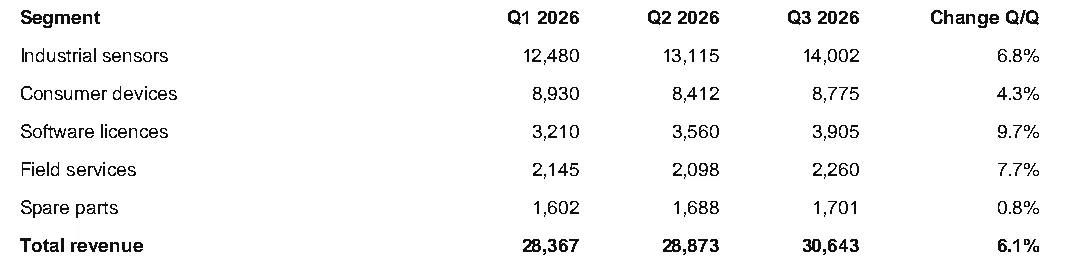
['Consumer devices', '8,930', '8,412', '8,775', '4.3%']The rows are right, but the header is cut: Segment Q | 1 2026 Q | …. Here is why:
Three habits make the text strategy more reliable:
- Crop first. Titles, notes and page numbers line up with columns by accident.
- Drop blank rows. Each line gets an edge above and below it, which creates empty rows in between (
[r for r in table if any(r)]). - Tune
min_words_vertical(default 3) when a phantom column appears, as shown on table not detected.
Option 2: put boundaries in the gutters
Columns are separated by gutters: vertical bands where no word on any row reaches. Rows are separated by the gaps between text lines. Measuring both from the words and handing them over as explicit lines avoids the text strategy’s guesswork, which is what the function in the short answer does:
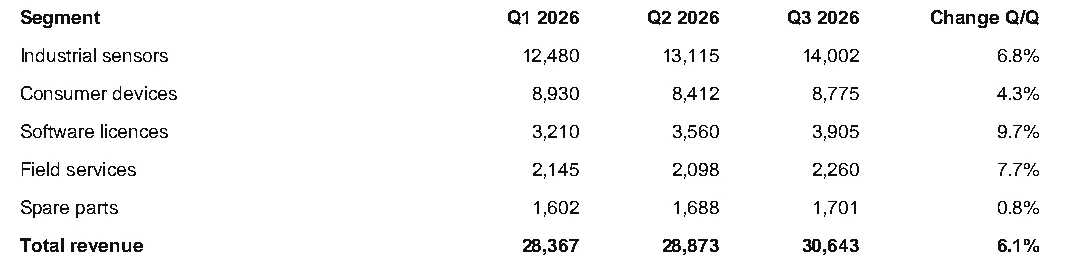
It works because it uses the union of all rows: a wide header and a narrow number in the same column overlap, so no false gutter appears between them, and a right-aligned number never pushes a boundary into its header.
Adjust min_gap (default 6 points) to the document: it is the narrowest white space you still consider a column break. Word spaces inside a cell are usually 2 to 4 points; column gutters are usually wider than 10.
When rows wrap
Measuring rows from text lines splits a wrapped cell (a long description on two lines) into two rows. Fold continuation rows back into the row above, using a column that is always filled on a real row, such as a date or ID:
def merge_continuations(rows, key_col=0):
    """Fold rows whose key column is empty into the row above (wrapped cells)."""
    merged = []
    for row in rows:
        if merged and not (row[key_col] or "").strip():
            merged[-1] = [f"{a} {b}".strip() if b else a for a, b in zip(merged[-1], row)]
        else:
            merged.append(list(row))
    return merged

# Rows as a text-based extraction returns them when a description wraps
rows = [
    ["2026-10-03", "Hardware store", "42.10"],
    ["", "(returned items, store credit)", ""],
    ["2026-10-04", "Coffee at Dock 4", "3.80"],
]
for row in merge_continuations(rows):
print(row)['2026-10-03', 'Hardware store (returned items, store credit)', '42.10']
['2026-10-04', 'Coffee at Dock 4', '3.80']Option 3: columns from the header row
When every column has a header word, the midpoints between header words are good column boundaries, and rows can still come from ruled lines or text. The tutorial’s bank statement uses this; it handles right-aligned numbers as long as headers do not overlap neighbouring columns.
Choosing between them
| Situation | Best option |
|---|---|
| Quick look, simple left-aligned table | Text strategy, cropped |
| Mixed left- and right-aligned columns, sparse cells | Gutters (option 2) |
| One header word per column, same layout on every page | Header positions (option 3) |
| Rows ruled, columns not | Explicit columns + "horizontal_strategy": "lines" |
| Columns overlap or cells span columns | Explicit lines tuned by hand, or a different tool |
Sparse tables (many empty cells) are where the explicit approaches shine: the text strategy cannot infer a column that is mostly empty, but a gutter or header position still defines it.
Try it
The Lab below starts on the borderless sample. Set both strategies to text to see option 1, or tick Click the page to add explicit lines, click in each gutter (and Shift+click between rows, or set horizontal_strategy to text) to build option 2 by hand:
Table Settings Lab
Drop a PDF here or choose a sample above.
Text-based PDFs work best. Scanned pages have nothing for pdfplumber to read until OCR adds a text layer.
Text and objects
Run pdfplumber to see extract_text() for this page.
Table Settings Lab
Explicit lines: none
table_settings = # defaults
Run pdfplumber to detect tables.
Crop and coordinates
Drag a rectangle on the page. pdfplumber's coordinates are in points from the top-left corner: (x0, top, x1, bottom).
Drag a box on the page to measure it.
PDF Doctor
Checks why extraction might fail: missing text layer, (cid:x) fonts, duplicated characters, rotation and ruling lines.