Text
Extract text with pdfplumber
extract_text() turns positioned characters into lines of text. Most surprises (merged words, stray spaces, doubled letters, jumbled columns) come from how it decides where one word ends and the next begins. This guide shows each case on a real page and the setting that fixes it.
Short answer
Call extract_text() on every page and join the results:
import pdfplumber

with pdfplumber.open("samples/report.pdf") as pdf:
    text = "\n".join(page.extract_text() for page in pdf.pages)

print(len(text), "characters")
print(text[:180])1387 characters
Hollow Pine Supply Co. · Annual inspection report 2026
Annual inspection report
1. Summary
Forty-eight sites were inspected between March and September 2026. Most sites passed; sitThis works on PDFs that contain real text (exported from Word, Excel, LaTeX, a reporting tool, a browser). If it returns an empty string, the page is probably a scanned image: see scanned PDFs. If it returns (cid:12)-style codes, see (cid:x) in text.
How pdfplumber builds text
A PDF page has no words or lines, only characters drawn at positions. extract_text() rebuilds the text in three passes:
- Characters → words. Walking left to right, a character starts a new word when the gap between the previous character’s right edge (
x1) and its left edge (x0) is more thanx_tolerance(default 3 points), or when it sits on a different line. - Words → lines. Words whose tops are within
y_tolerance(default 3 points) form one line, sorted left to right. - Lines → string. Lines are joined top to bottom with newlines. With
layout=True, pdfplumber also adds spaces and blank lines to approximate where the text sat on the page.
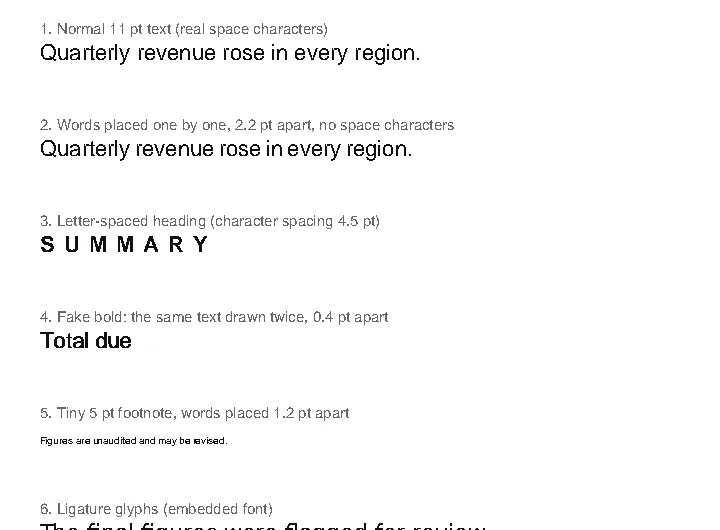
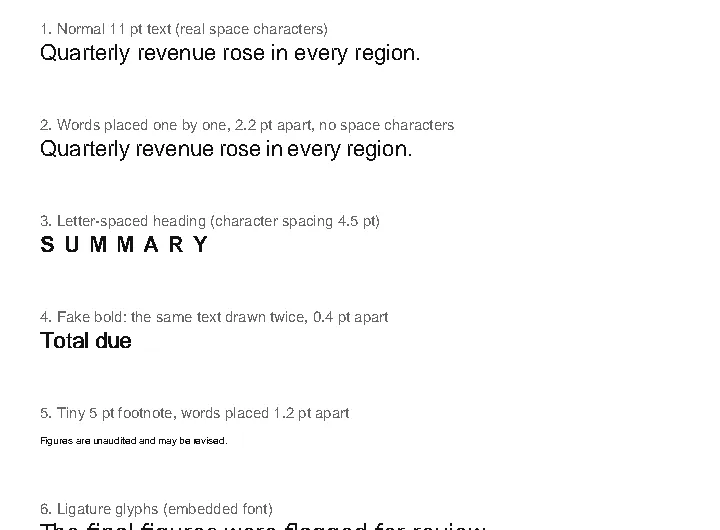
So whether you get Quarterly revenue or Quarterlyrevenue depends only on the gap between y and r and on x_tolerance. The sample below, text-quirks.pdf, reproduces the cases people ask about most. Toggle words and chars and hover to see what was grouped:
Keep the layout with layout=True
By default each line is the words joined by single spaces. layout=True keeps horizontal and vertical position, which helps with forms, receipts and side-by-side blocks:
import pdfplumber

with pdfplumber.open("samples/invoice.pdf") as pdf:
    page = pdf.pages[0]
    text = page.extract_text(layout=True)

# Print the first lines, trimming the page's empty margins
lines = [line.rstrip() for line in text.splitlines()]
lines = [line for line in lines if line.strip()]
indent = min(len(line) - len(line.lstrip()) for line in lines)
for line in lines[:9]:
print(line[indent:])Hollow Pine Supply Co. INVOICE
418 Quarry Road, Unit 6
Invoice no. INV-2026-0417
Millbrook, OR 97000
billing@hollowpine.example Issue date 2026-10-03
Due date 2026-11-02
PO number PO-88213
BILL TO
Larkspur Robotics GmbHCompare this with plain extraction in the tutorial, where Invoice no. ended up below the street address. With layout=True the right-hand column stays on the right.
The spacing is controlled by x_density (points per character, default 7.25) and y_density (points per line, default 13). Lower x_density to give each character less room when text looks squashed together; layout_width_chars and layout_height_chars fix the output grid size instead. Layout mode does not reorder columns: for two-column articles see multi-column layouts.
Missing spaces: words run together
When a PDF places each word separately without a space character, which is common in justified text and output from some design tools, the gap between words is all pdfplumber has to go on. If that gap is under 3 points, the words merge.
import pdfplumber

with pdfplumber.open("samples/text-quirks.pdf") as pdf:
    page = pdf.pages[0]
    for kwargs in [{}, {"x_tolerance": 1.5}, {"x_tolerance_ratio": 0.15}]:
        lines = page.extract_text(**kwargs).splitlines()
        print(kwargs or "defaults (x_tolerance=3)")
        print("   11 pt:", lines[4])
print(" 5 pt:", lines[10])defaults (x_tolerance=3)
11 pt: Quarterlyrevenueroseineveryregion.
5 pt: Figuresareunauditedandmayberevised.
{'x_tolerance': 1.5}
11 pt: Quarterly revenue rose in every region.
5 pt: Figuresareunauditedandmayberevised.
{'x_tolerance_ratio': 0.15}
11 pt: Quarterly revenue rose in every region.
5 pt: Figures are unaudited and may be revised.Lowering x_tolerance to 1.5 fixes the 11 pt line, but the 5 pt footnote still merges because its gaps are only 1.2 points. x_tolerance_ratio solves both: the tolerance becomes that fraction of each character’s font size (0.15 × 11 pt = 1.65 pt; 0.15 × 5 pt = 0.75 pt), so small and large type are judged fairly.
Extra spaces: letter-spaced headings
The opposite problem: headings set with wide character spacing come out as S U M M A R Y, because each letter is more than 3 points from the next. Raise x_tolerance, but only for that region, or real words elsewhere will merge:
import pdfplumber

with pdfplumber.open("samples/text-quirks.pdf") as pdf:
    page = pdf.pages[0]
    heading = page.crop((55, 196, 300, 211))   # just the spaced-out heading
    print(heading.extract_text())
print(heading.extract_text(x_tolerance=6))S U M M A R Y
SUMMARYDoubled letters: TToottaall
Some PDFs fake bold text by drawing the same text twice, a fraction of a point apart. pdfplumber faithfully reports both copies. dedupe_chars() removes characters that repeat the same text at (almost) the same position:
import pdfplumber

with pdfplumber.open("samples/text-quirks.pdf") as pdf:
    page = pdf.pages[0]
    print(page.extract_text().splitlines()[8])
print(page.dedupe_chars().extract_text().splitlines()[8])TToottaall dduuee
Total duededupe_chars(tolerance=1) is the default; it also compares font name and size so that genuinely different characters are kept. More cases are on missing spaces and doubled letters.
Read line by line, with positions
extract_text_lines() returns each line with its bounding box (and its characters, unless you pass return_chars=False). That is the easiest way to find headings, totals or the line after a label:
import pdfplumber

with pdfplumber.open("samples/invoice.pdf") as pdf:
    lines = pdf.pages[0].extract_text_lines()

print(len(lines), "lines")
for line in lines[8:12]:
    print(f'top={line["top"]:6.1f}  x0={line["x0"]:5.1f}  {line["text"]}')
print(sorted(lines[0].keys()))25 lines
top= 167.1 x0= 54.0 Larkspur Robotics GmbH
top= 180.1 x0= 54.0 Attn: Accounts Payable
top= 193.1 x0= 54.0 Feldstraße 12
top= 206.1 x0= 54.0 20357 Hamburg, Germany
['bottom', 'chars', 'text', 'top', 'x0', 'x1']For individual words with fonts and sizes, use extract_words(). To find text by pattern, use page.search().
Text without the tables
A frequent request: extract the narrative text but skip anything inside a table. Find the tables, then keep only characters whose centre is outside every table box:
import pdfplumber

with pdfplumber.open("samples/report.pdf") as pdf:
    page = pdf.pages[0]
    table_boxes = [t.bbox for t in page.find_tables()]

    def outside_tables(obj):
        if obj["object_type"] != "char":
            return True
        x = (obj["x0"] + obj["x1"]) / 2
        y = (obj["top"] + obj["bottom"]) / 2
        return not any(x0 <= x <= x1 and top <= y <= bottom
                       for x0, top, x1, bottom in table_boxes)

print(page.filter(outside_tables).extract_text())Hollow Pine Supply Co. · Annual inspection report 2026
Annual inspection report
1. Summary
Forty-eight sites were inspected between March and September 2026. Most sites passed; sites marked Follow-up
need a second visit before 31 December 2026.
Overall status: 11 sites need follow-up (see table below).
Methodology: pdfplumber.dev/cookbook/
2. Results by site
Table continues on the next page.
1The table of site results on that page is gone; the headings, summary and footnote remain. page.filter() takes any function of an object, so the same approach removes headers, footers, watermarks or text in a given colour (crop and coordinates).
Ligatures and Unicode
Typeset documents often use single glyphs for fi, fl and ffi. By default pdfplumber expands these seven ligatures into plain letters so that searches and comparisons work. Pass expand_ligatures=False to keep the original glyphs. For other compatibility characters, normalize every character when you open the file with unicode_norm ("NFC", "NFKC", "NFD" or "NFKD"):
import pdfplumber

path = "samples/text-quirks.pdf"
with pdfplumber.open(path) as pdf:
    page = pdf.pages[0]
    print(page.extract_text().splitlines()[-1])                         # default
    print(page.extract_text(expand_ligatures=False).splitlines()[-1])   # raw glyphs

with pdfplumber.open(path, unicode_norm="NFKC") as pdf:
    chars = [c["text"] for c in pdf.pages[0].chars]
print("ligature chars after NFKC:", sum(c in "fifl" for c in chars))The final figures were flagged for review.
The final figures were flagged for review.
ligature chars after NFKC: 0Rotated, vertical and right-to-left text
Since 0.11.0 pdfplumber can read text in any of four directions. Set line_dir (the direction lines stack: "ttb", "btt", "ltr", "rtl") and char_dir (the direction characters run within a line) for upright text, and line_dir_rotated / char_dir_rotated for text that is rotated on the page. For example, vertical Japanese text is usually read with char_dir="ttb" (characters top to bottom) and line_dir="rtl" (columns right to left); confirm on your own files.
Right-to-left scripts such as Arabic and Hebrew are stored in many different ways by PDF producers, so check the result on your own files. Reversed text is a known pain point (issue #1159 on the official repository).
Speed: extract_text_simple() and caching
extract_text_simple() skips most of the layout logic and simply clusters characters into lines. It suits search indexing and bulk jobs where layout does not matter:
import statistics
import time
import pdfplumber

def time_once(method):
    with pdfplumber.open("samples/two-column.pdf") as pdf:
        page = pdf.pages[0]
        page.chars                      # parse first; time only text assembly
        t0 = time.perf_counter()
        getattr(page, method)()
        return (time.perf_counter() - t0) * 1000

for method in ["extract_text", "extract_text_simple"]:
    runs = [time_once(method) for _ in range(15)]
print(f"{method:<20} median {statistics.median(runs):5.1f} ms")extract_text median 10.2 ms
extract_text_simple median 2.6 mspdfplumber also caches text extraction per page and per set of arguments. Calling extract_text() twice with the same options costs nothing the second time; changing an option recomputes:
import time
import pdfplumber

with pdfplumber.open("samples/two-column.pdf") as pdf:
    page = pdf.pages[0]
    for attempt in ["first call (parses page)", "same arguments again", "different arguments"]:
        kwargs = {"x_tolerance": 2} if attempt == "different arguments" else {}
        t0 = time.perf_counter()
        page.extract_text(**kwargs)
print(f"{attempt:<26} {(time.perf_counter() - t0) * 1000:6.2f} ms")first call (parses page) 91.70 ms
same arguments again 0.01 ms
different arguments 7.52 msMost of the first call is parsing the page itself. On large documents, close pages you are done with (page.close()) to release that cache. Measured numbers for big files are on performance.
Every extract_text() option
Defaults verified against the pdfplumber 0.11.10 source.
| Option | Default | What it does |
|---|---|---|
x_tolerance |
3 |
Max horizontal gap (points) between characters of one word |
y_tolerance |
3 |
Max vertical difference (points) between words on one line |
x_tolerance_ratio |
None |
If set, gap limit = ratio × font size, overriding x_tolerance |
y_tolerance_ratio |
None |
Same for the vertical limit |
layout |
False |
Pad with spaces and blank lines to mimic page layout |
x_density |
7.25 |
Layout mode: points per output character |
y_density |
13 |
Layout mode: points per output line |
layout_width, layout_height |
page size | Layout mode: area to lay out, in points |
layout_width_chars, layout_height_chars |
0 |
Layout mode: output size in characters/lines instead |
keep_blank_chars |
False |
Treat space characters as part of words instead of separators |
use_text_flow |
False |
Keep the order characters appear in the PDF instead of sorting by position |
line_dir, char_dir |
"ttb", "ltr" |
Reading directions for upright text |
line_dir_rotated, char_dir_rotated |
flipped: "ltr", "ttb" (default to char_dir and line_dir) |
Reading directions for rotated text |
split_at_punctuation |
False |
True or a string of characters that also end a word |
expand_ligatures |
True |
Replace fi, fl, ff, ffi, ffl, ſt, st with plain letters |
extra_attrs |
None |
Also split words when these char attributes change, e.g. ["fontname", "size"] |
pdfplumber.open(..., unicode_norm=...) and laparams apply when opening; see pdfplumber.open().