Text
Coordinates, crop() and bounding boxes
Everything pdfplumber finds has a position, and every region you ask for is a box in the same coordinates. Once the coordinate system is clear, pulling a field from a form, dropping running headers or reading only one column is a one-liner.
Short answer
Boxes are (x0, top, x1, bottom) in points, measured from the top-left corner of the page. Crop to a box and use the result like a page:
import pdfplumber

with pdfplumber.open("samples/invoice.pdf") as pdf:
    page = pdf.pages[0]
    # (x0, top, x1, bottom) in points, measured from the top-left corner
    bill_to = page.crop((50, 125, 300, 225))
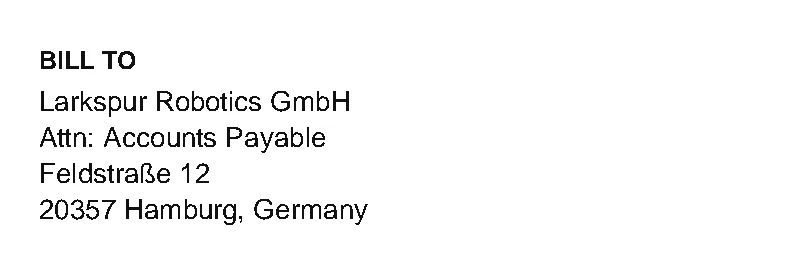
print(bill_to.extract_text())BILL TO
Larkspur Robotics GmbH
Attn: Accounts Payable
Feldstraße 12
20357 Hamburg, GermanyNot sure of the numbers? Drag a box in the measuring tool below and copy them.
The coordinate system
x0, top, x1, bottom are measured from the page's top-left corner, the convention for every bbox you pass to pdfplumber. y0, y1 are the PDF's native coordinates, measured up from the bottom edge. doctop is top plus the height of every earlier page.Every char, word, line, rect and table cell carries these keys. A real word from the second page of report.pdf:
import pdfplumber

with pdfplumber.open("samples/report.pdf") as pdf:
    page = pdf.pages[1]                       # second page
    word = page.extract_words()[1]
    print("page size:", page.width, "x", page.height)
    for key in ["text", "x0", "x1", "top", "bottom", "doctop"]:
        value = word[key]
        print(f"{key:7}", round(value, 2) if isinstance(value, float) else value)

    char = page.chars[0]
print("char y0/y1 (from the bottom):", round(char["y0"], 2), round(char["y1"], 2))page size: 612 x 792
text Pine
x0 80.22
x1 96.23
top 27.66
bottom 35.66
doctop 819.66
char y0/y1 (from the bottom): 756.34 764.34doctop is 819.66 because the word sits 27.66 pt from the top of page 2, and page 1 is 792 pt tall. Use doctop when you sort or compare positions across a whole document; use top within a page. The PDF’s own y0/y1 (from the bottom) are there too, but every pdfplumber method that takes a box expects the top-left convention.
crop(), within_bbox() and outside_bbox()
The three methods take the same box and differ only in what happens to objects on the boundary:
| Method | Keeps | Objects crossing the edge |
|---|---|---|
crop(bbox) |
objects at least partly inside | kept, trimmed to the box |
within_bbox(bbox) |
objects entirely inside | dropped |
outside_bbox(bbox) |
objects entirely outside | dropped |
Here is a box that slices through two lines of the invoice’s address block:
import pdfplumber

with pdfplumber.open("samples/invoice.pdf") as pdf:
    page = pdf.pages[0]
    box = (50, 160, 130, 180)            # cuts through "Larkspur Robotics GmbH"

    print("crop:        ", repr(page.crop(box).extract_text()))
    print("within_bbox: ", repr(page.within_bbox(box).extract_text()))
print("outside_bbox:", repr(page.outside_bbox(box).extract_text()[:32]), "...")crop: 'BILL TO\nLarkspur Robotics'
within_bbox: 'Larkspur Robotic'
outside_bbox: 'Hollow Pine Supply Co. INVOICE\n4' ...crop() keeps BILL TO (only its lower edge is inside) and the whole of Robotics, because both are partly inside. within_bbox() keeps only characters entirely inside, so the s that crosses the right edge is lost. When you crop to read a field, give the box a few points of margin; when you crop to exclude something, within_bbox() is the stricter choice.
Boxes must fit inside the page
By default (strict=True) a box that extends past the page raises an error:
import pdfplumber

with pdfplumber.open("samples/invoice.pdf") as pdf:
    page = pdf.pages[0]
page.crop((0, 700, 612, 800)) # bottom edge 800 > page height 792Traceback (most recent call last):
…
~~~~~~~~~~~~~~~~~~^^^^^^^^^^^^^^^^^^^^^^^^^^^^^
File ".venv/lib/python3.13/site-packages/pdfplumber/page.py", line 671, in test_proposed_bbox
raise ValueError(
...<2 lines>...
)
ValueError: Bounding box (0, 700, 612, 800) is not fully within parent page bounding box (0, 0, 612, 792)Clamp your box to page.bbox, or pass strict=False to allow it.
Cropping a cropped page
A cropped page keeps the original page’s coordinates, so a second crop uses the same numbers as the first. Pass relative=True to give the box as an offset from the cropped region’s top-left corner instead. Both of these select the same area:
import pdfplumber

with pdfplumber.open("samples/invoice.pdf") as pdf:
    page = pdf.pages[0]
    top_half = page.crop((0, 0, page.width, page.height / 2))
    absolute = top_half.crop((50, 160, 300, 220))
    relative = page.crop((0, 100, page.width, 400)).crop((50, 60, 300, 120), relative=True)
    print(absolute.bbox)
    print(relative.bbox)
print(absolute.extract_text() == relative.extract_text())(50, 160, 300, 220)
(50, 160, 300, 220)
TrueRemove headers and footers
Running headers and page numbers sit in fixed strips at the top and bottom of every page. Crop them away before extracting:
import pdfplumber

with pdfplumber.open("samples/two-column.pdf") as pdf:
    for page in pdf.pages:
        print(f"--- page {page.page_number}: first and last line, before and after ---")
        lines = page.extract_text().splitlines()
        print(lines[0], "|", lines[-1])

        body = page.crop((0, 50, page.width, page.height - 45))   # 50 pt top, 45 pt bottom
        lines = body.extract_text().splitlines()
print(lines[0][:45], "|", lines[-1][-40:])--- page 1: first and last line, before and after ---
THE DATA DESK · FIELD NOTES November 2026 | Page 1 of 2
Reading water-quality reports at scale | out in a table on page 27. The table has
--- page 2: first and last line, before and after ---
THE DATA DESK · FIELD NOTES November 2026 | Page 2 of 2
8 columns and is ruled only between rows, so | ngs above the action level, set out in aTo find the numbers, hover over the header’s lowest line and the footer’s highest line in the measuring tool, or compute them: the bottom of the header’s last word plus a small margin. When the header height varies between pages, crop to the top of the first word in the body font size instead (font sizes are on words, chars and fonts).
Keep or drop objects with filter()
page.filter(fn) keeps the objects for which fn(obj) is true, and works with any property, not just position. The invoice prints its footer, the company address and the field labels in grey (0.4, 0.4, 0.4) and everything else in near-black, so a colour test separates them:
import pdfplumber

GREY = (0.4, 0.4, 0.4)

with pdfplumber.open("samples/invoice.pdf") as pdf:
    page = pdf.pages[0]
    colours = {c["non_stroking_color"] for c in page.chars}
    print("text colours on the page:", colours)

    no_grey = page.filter(lambda obj: obj["object_type"] != "char"
                          or obj["non_stroking_color"] != GREY)
    text = no_grey.extract_text()
    print(len(page.chars) - len(no_grey.chars), "grey characters removed")
print("footer gone:", "fictional" not in text, "| body kept:", "Larkspur Robotics" in text)text colours on the page: {(0.066667, 0.066667, 0.066667), (0.4, 0.4, 0.4)}
268 grey characters removed
footer gone: True | body kept: TrueCompare colours exactly as pdfplumber reports them: this text is (0.066667, 0.066667, 0.066667), not pure black (0,), so a test for == (0,) would silently drop everything. Print the set of colours first, as above. And return True for objects you are not testing (here, everything that is not a char), or lines and rects disappear too and table extraction breaks.
Page boxes
A PDF page can declare up to five boxes. pdfplumber exposes all of them (trimbox, bleedbox and artbox since 0.11.7), in the same top-left coordinates:
import pdfplumber

# Every page box is set differently on this page
with pdfplumber.open("samples/page-boxes.pdf") as pdf:
    page = pdf.pages[0]
    for name in ["mediabox", "cropbox", "bleedbox", "trimbox", "artbox", "bbox"]:
        print(f"{name:9}", tuple(round(v, 1) for v in getattr(page, name)))

    trimmed = page.crop(page.trimbox)      # only what is inside the trim box
print(len(page.chars), "chars on the page,", len(trimmed.chars), "inside the trim box")mediabox (0, 0.0, 623.6, 870.2)
cropbox (14.2, 42.5, 581.1, 856.1)
bleedbox (0, 0.0, 623.6, 870.2)
trimbox (28.4, 56.7, 566.9, 841.9)
artbox (42.5, 70.9, 552.8, 827.7)
bbox (0, 0.0, 623.6, 870.2)
321 chars on the page, 248 inside the trim boxpage.bbox, which sets width and height and limits cropping, is the MediaBox. PDF viewers usually display the CropBox, so a page can contain objects you never see on screen: printers’ marks, crop marks or text outside the visible area. Crop to page.cropbox to read only what a viewer shows.
Rotated pages
When a page carries a /Rotate setting, pdfplumber reports positions for the page as displayed: a landscape table saved on a portrait page with /Rotate 90 measures 612 × 1008. Its text runs sideways (upright is False for every character), so the default reading order produces one word per line. Tell pdfplumber which way the text runs, and how to write it out:
import pdfplumber

# The FBI NICS page saved with /Rotate 90 (from pdfplumber's test suite)
with pdfplumber.open("samples/real/nics-background-checks-2015-11-rotated.pdf") as pdf:
    page = pdf.pages[0]
    print("rotation:", page.rotation, "| size as displayed:", page.width, "x", page.height)
    print("upright chars:", sum(c["upright"] for c in page.chars), "of", len(page.chars))

    print(page.extract_text().splitlines()[:3])         # default: one word per line

    text = page.extract_text(
        line_dir="rtl", char_dir="ttb",                  # how the text runs on the page
        line_dir_rotated="rtl", char_dir_rotated="ttb",
        line_dir_render="ttb", char_dir_render="ltr",    # how to write it out
    )
print(text.splitlines()[:2])rotation: 90 | size as displayed: 612 x 1008
upright chars: 0 of 4319
['Page', '1 of 205', 'These']
['NICS Firearm Background Checks', 'November - 2015']The result reads exactly like the unrotated version of the same report. The direction options are described on extract text.
Measure boxes on your own PDF
Drag a rectangle on the page to read its (x0, top, x1, bottom) and compare what crop(), within_bbox() and outside_bbox() return for it. It runs the real pdfplumber in your browser; your file is not uploaded.
BBox Picker
Drop a PDF here or choose a sample above.
Text-based PDFs work best. Scanned pages have nothing for pdfplumber to read until OCR adds a text layer.
Text and objects
Run pdfplumber to see extract_text() for this page.
Table Settings Lab
Explicit lines: none
table_settings = # defaults
Run pdfplumber to detect tables.
Crop and coordinates
Drag a rectangle on the page. pdfplumber's coordinates are in points from the top-left corner: (x0, top, x1, bottom).
Drag a box on the page to measure it.
PDF Doctor
Checks why extraction might fail: missing text layer, (cid:x) fonts, duplicated characters, rotation and ruling lines.