Tables
Tables that span pages
pdfplumber finds tables one page at a time, so a long table arrives in pieces. Putting it back together takes three checks: is this the same table, is the first row a repeated header, and was the last row cut in half by the page break. Each is a few lines, tested here on two sample documents.
Short answer
Extract each page’s table with the same settings, skip the header where a page repeats it, and add the rows to one list:
import pdfplumber

rows, header = [], None
with pdfplumber.open("samples/report.pdf") as pdf:
    for page in pdf.pages:
        for table in page.extract_tables():
            if header is None:
                header = table[0]
            body = table[1:] if table[0] == header else table   # drop repeated header
            rows.extend(body)

print(header)
print(len(rows), "rows; first", rows[0], "last", rows[-1])
print("all sites present:", [r[0] for r in rows] == [f"Site {i:02d}" for i in range(1, 49)])['Site', 'Result', 'Reading (ppb)']
48 rows; first ['Site 01', 'Pass', '3.9'] last ['Site 48', 'Pass', '7.0']
all sites present: TrueThe sample is report.pdf: 14 sites on page 1, 34 on page 2, the header repeated on both. The last line checks that every site from 01 to 48 arrived exactly once, in order.
pdfplumber has no notion of a table continuing onto the next page. Each page is analysed on its own, and a table that runs over three pages is three tables to pdfplumber. The joining is up to you, and the rest of this page covers the parts that go wrong.
Is it the same table?
A page can start a new table rather than continue the old one, and some pages have a small table (totals, a legend) before the continuation. Compare column positions: a continued table almost always keeps its column boundaries.
import pdfplumber

def column_edges(table):
    return [round(col.cells[0][0]) for col in table.columns if col.cells[0]]

with pdfplumber.open("samples/report.pdf") as pdf:
    tables = [(page.page_number, t) for page in pdf.pages for t in page.find_tables()]

for (p1, a), (p2, b) in zip(tables, tables[1:]):
    same = column_edges(a) == column_edges(b)
print(f"table on page {p2} continues page {p1}'s table: {same} {column_edges(a)} vs {column_edges(b)}")table on page 2 continues page 1's table: True [54, 200, 330] vs [54, 200, 330]Round the positions, because the same column can be a fraction of a point apart on different pages. If a document’s columns legitimately shift (a landscape page, a wider last column), compare the number of columns and the header text instead.
Comparing the header text alone is weaker than it looks: many reports print the header only on the first page, and two different tables can share a header such as Date | Amount.
A row cut by the page break
Long rows break across pages too. In this maintenance log, ticket MT-1058’s notes start at the bottom of page 1 and finish at the top of page 2, and page 2 does not repeat the header:
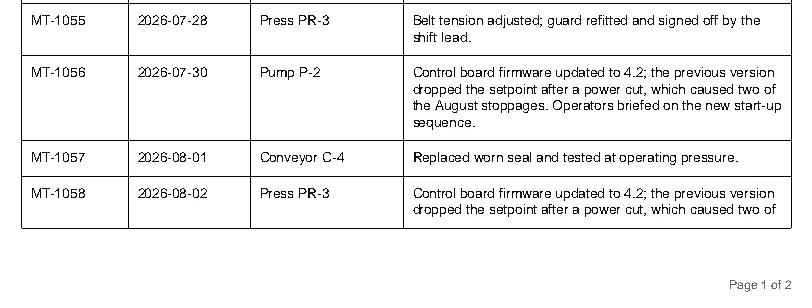
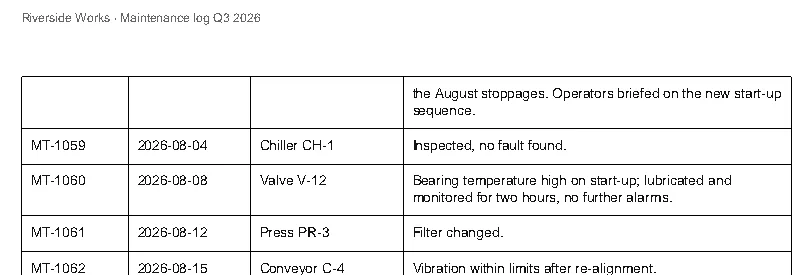
Extracted page by page, that is 18 rows plus 15 rows: 33 rows for 32 tickets, one of them with three empty cells and half a sentence. The continuation is recognisable by its empty key column. A real row always has a ticket number, so a row without one belongs to the row above:
import pdfplumber

def edges(table):
    return [round(cell[0]) for cell in table.rows[-1].cells if cell]

rows, prev = [], None
with pdfplumber.open("samples/split-rows.pdf") as pdf:
    for page in pdf.pages:
        for table in page.find_tables():
            data = table.extract()
            if prev is None:                       # first table: keep the header
                header, data = data[0], data[1:]
            elif edges(table) != edges(prev):      # different columns: a new table
                break
            for row in data:
                if rows and not row[0]:            # no ticket number: the row above continues
                    rows[-1][3] += "\n" + row[3]
                else:
                    rows.append(row)
            prev = table

print(header)
print(len(rows), "rows")
for row in rows[16:19]:
    print([cell.replace("\n", " ") for cell in row])
print("tickets MT-1041 to MT-1072, none missing:", [r[0] for r in rows] == [f"MT-{n}" for n in range(1041, 1073)])['Ticket', 'Date', 'Asset', 'Notes']
32 rows
['MT-1057', '2026-08-01', 'Conveyor C-4', 'Replaced worn seal and tested at operating pressure.']
['MT-1058', '2026-08-02', 'Press PR-3', 'Control board firmware updated to 4.2; the previous version dropped the setpoint after a power cut, which caused two of the August stoppages. Operators briefed on the new start-up sequence.']
['MT-1059', '2026-08-04', 'Chiller CH-1', 'Inspected, no fault found.']
tickets MT-1041 to MT-1072, none missing: TrueWe also compared all 32 rows, cell by cell, against the data the sample was generated from: they match once the line breaks inside long notes are replaced with spaces.
Pick the key column carefully. It must be filled on every real row: an ID, a date or a reference number. Descriptions and amounts are poor choices, because a real row can leave them blank.
Headers, footers and text near the table
Ruled tables are found from their lines, so running headers, footers and notes such as Table continues on the next page stay out of the result. The text strategy has no lines to stop at. On page 2 of the report, {"vertical_strategy": "text", "horizontal_strategy": "text"} returns the running header as the table’s first row, split mid-word: ['Hollow Pine Supply Co. · Annual inspectio', 'n report 2026', ''].
For borderless tables, crop each page to the band between the running header and footer before extracting (page.crop((0, top, page.width, bottom))), then place the columns explicitly as in borderless tables. The band is usually the same on every page except the first, where a title sits above the table. Crop and coordinates shows how to measure it.
Into one DataFrame, with a check
Once the rows are in one list, pd.DataFrame(rows, columns=header) finishes the job. Then check the result against something the document prints, such as a row count or a total. The export guide does this for a three-page bank statement: 58 transactions, and the closing balance recomputed from the extracted debits and credits equals the printed one.
For documents with hundreds of pages, process one page at a time and release each page when you are done with it, so memory stays flat (performance).