Start
Install pdfplumber
One command installs pdfplumber and its dependencies on Windows, macOS and Linux. We ran every method below on all three systems, from Python 3.8 to 3.14, and recorded what happened.
Short answer
Install it into the Python you will run your code with:
python3 -m pip install pdfplumberOn Windows use py -m pip install pdfplumber. Then check that it imports:
import pdfplumber
import pdfminer

print("pdfplumber", pdfplumber.__version__)
print("pdfminer.six", pdfminer.__version__)pdfplumber 0.11.10
pdfminer.six 20260107pip install pdfplumber brings in three direct dependencies, seven packages in all: pdfminer.six (the PDF parser underneath), Pillow and pypdfium2 (page rendering for visual debugging), and, through pdfminer.six, cryptography for encrypted PDFs (with its helpers cffi and pycparser) and charset-normalizer. All of them ship as prebuilt wheels, so you do not need a compiler, Ghostscript, ImageMagick or any other system package.
Pick your installer
Every command below was run on Linux, Windows and macOS in our test workflow. The timings are wall-clock seconds on GitHub’s hosted runners with a cold download cache.
python -m venv .venv
source .venv/bin/activate        # Windows: .venv\Scripts\activate
python -m pip install pdfplumber
Measured: 3–5 s on Linux and macOS, 6–11 s on Windows (12 runs, Python 3.10–3.14). Using python -m pip instead of bare pip guarantees the package lands in the interpreter you call python with.
uv venv
uv pip install pdfplumber
# or, inside a uv project:
uv add pdfplumber
Measured: under 1 s on Linux and macOS and about 1 s on Windows (uv 0.13.7, 8 packages prepared in 91–170 ms). To run a one-off script without managing an environment: uv run --with pdfplumber python script.py.
conda install -c conda-forge pdfplumber
# or a fresh environment:
conda create -n pdf -c conda-forge python=3.13 pdfplumber
conda-forge ships 0.11.10 with pdfminer.six 20260107. Creating a new environment took 7–8 s on Linux and macOS and 20 s on Windows (conda 26.9.4, Miniforge). Always name the conda-forge channel explicitly.
poetry add pdfplumberPoetry resolves the same dependencies. Because pdfplumber pins pdfminer.six to an exact version, do not also pin a different pdfminer.six in your project; the resolver will refuse the combination.
If you only want the pdfplumber command (to dump text, CSV or JSON from a terminal), install it as an isolated tool:
uv tool install pdfplumber        # or: pipx install pdfplumber
pdfplumber invoice.pdf --format text
Or run it once without installing anything permanently:
uvx --from pdfplumber pdfplumber invoice.pdf --format textHollow Pine Supply Co. INVOICE
418 Quarry Road, Unit 6
Invoice no. INV-2026-0417
Millbrook, OR 97000
billing@hollowpine.example Issue date 2026-10-03See the command-line guide for every option.
Check that it worked
The version check in the short answer is the most reliable test, because it runs in the same interpreter as your code. Two more checks:
python -m pip show pdfplumberName: pdfplumber
Version: 0.11.10
Summary: Plumb a PDF for detailed information about each char, rectangle, and line.
Home-page: https://github.com/jsvine/pdfplumber
Author: Jeremy Singer-Vine
Requires: pdfminer.six, Pillow, pypdfium2And a real smoke test on a PDF (download invoice.pdf):
import pdfplumber

# Any text-based PDF works; this one is the site's sample invoice.
with pdfplumber.open("samples/invoice.pdf") as pdf:
    print(len(pdf.pages), "page(s)")
    first_lines = pdf.pages[0].extract_text().splitlines()[:2]
print(first_lines)1 page(s)
['Hollow Pine Supply Co. INVOICE', '418 Quarry Road, Unit 6']Which Python versions work
pdfplumber 0.11.10 declares Requires-Python >=3.8, but it pins pdfminer.six 20260107 and Pillow ≥ 12.2, and both of those need Python 3.10 or newer. So the real minimum is 3.10. On older interpreters pip quietly installs an older pdfplumber instead of failing:
| Your Python | pip install pdfplumber gives you | pdfminer.six | Pillow |
|---|---|---|---|
| 3.11 – 3.14 | 0.11.10 (current) | 20260107 | 13.0.0 |
| 3.10 | 0.11.10 (current) | 20260107 | 12.3.0 |
| 3.9.25 | 0.11.8 | 20251107 | 11.3.0 |
| 3.8.18 | 0.11.5 | 20231228 | 10.4.0 |
If you pin the current version on Python 3.8 or 3.9, the install fails with:
ERROR: Could not find a version that satisfies the requirement pdfminer.six==20260107 (from pdfplumber) (from versions: 20140915, …, 20251107)
ERROR: No matching distribution found for pdfminer.six==20260107
The fix is to upgrade Python (3.12 or 3.13 is the most common choice among pdfplumber users: 67% of PyPI downloads in the last six months), or to accept the older release and read what changed since then.
Windows, macOS and Linux notes
- Use the Python launcher:
py -m pip install pdfplumber. It always targets a real Python install, unlike the Microsoft Store alias that opens the Store when Python is missing. - On 64-bit Intel/AMD Windows every dependency installs from a prebuilt wheel; no Visual C++ build tools are needed.
- On Windows on ARM, PyPI had no ARM64 wheel for cryptography 50.0.2 when we checked (2026-11-04), so pip would try to compile it. Use the x64 build of Python (it runs under emulation) or conda-forge.
- If printing extracted text crashes with
UnicodeEncodeError: 'charmap' codec can't encode character, the console encoding is the problem, not pdfplumber. Runset PYTHONUTF8=1(cmd) or$env:PYTHONUTF8=1(PowerShell), or write to a file withencoding="utf-8". Details on the error index.
- Use
python3 -m pip install pdfplumberinside a virtual environment. - Homebrew’s Python refuses
pip installoutside a virtual environment. This is what we got with Homebrew Python 3.15.1 on a macOS runner:
error: externally-managed-environment

× This environment is externally managed
╰─> To install Python packages system-wide, try brew install
  xyz, where xyz is the package you are trying to
  install.

  If you wish to install a Python library that isn't in Homebrew,
  use a virtual environment:

  python3 -m venv path/to/venv
  source path/to/venv/bin/activate
  python3 -m pip install xyz
Follow its advice: create a venv (pip tab above) and install there. Avoid --break-system-packages; it can break Homebrew’s own tools.
- Our macOS runs were on Apple silicon (arm64); every dependency installed from a prebuilt wheel.
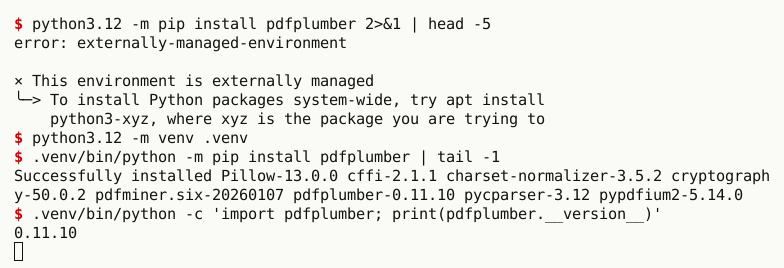
- Ubuntu 24.04 and Debian 12+ mark the system Python as externally managed, so pip refuses to install into it. On a stock Ubuntu 24.04 (Python 3.12.3, pip 24.0):
error: externally-managed-environment

× This environment is externally managed
╰─> To install Python packages system-wide, try apt install
  python3-xyz, where xyz is the package you are trying to
  install.
Use a venv (python3 -m venv .venv, which needs the python3-venv apt package on Ubuntu), uv, or pipx/uv tool for the command-line tool.
- We found no
python3-pdfplumberpackage in the Ubuntu 24.04 archives; install from PyPI. - About 91% of pdfplumber downloads come from Linux, mostly servers and containers. The Docker section has a tested image.
Jupyter, Colab and IDEs
Jupyter and Google Colab. Install from a notebook cell with the %pip magic, which installs into the kernel the notebook is running:
%pip install pdfplumberPrefer %pip over !pip: !pip runs whatever pip is first on the shell’s PATH, which is often a different Python from the kernel. Restart the kernel if import pdfplumber still fails. Once installed, page images display inline in notebooks; there is a screenshot on visual debugging.
VS Code, PyCharm, Spyder. Most “installed but can’t import” reports come from the editor using a different interpreter from the terminal you installed into. Print the interpreter from inside the editor and install into that one:
import sys

# Run this in the same place you run your code (terminal, notebook, IDE).
# pip must install into *this* interpreter.
print(sys.executable)
print(sys.version.split()[0]).venv/bin/python
3.13.18Then run <that path> -m pip install pdfplumber, or select the interpreter you installed into (VS Code: Python: Select Interpreter; PyCharm: Settings → Project → Python Interpreter; Spyder: Preferences → Python interpreter). The import error guide walks through every variant of this problem.
Docker
pdfplumber needs no system libraries, so a slim base image is enough:
FROM python:3.13-slim
RUN pip install --no-cache-dir pdfplumber==0.11.10
The resulting image measured 278MB in our build (most of that is the base image), and the CLI and library both ran inside it. Pin the version in images so a new pdfminer.six release cannot change your output silently.
What gets installed
On Linux with Python 3.13, pdfplumber and its dependencies take 58.7 MB on disk; on Windows and macOS about 46–49 MB. import pdfplumber took 40–135 ms across our 12 test runs.
- pillow21.8 MB
- cryptography15.6 MB
- pdfminer.six9.4 MB
- pypdfium28.8 MB
- cffi1.2 MB
- charset-normalizer0.9 MB
- pycparser0.6 MB
- pdfplumber0.4 MB
Source: our CI run on GitHub-hosted ubuntu-latest, 2026-11-04 (sum of installed file sizes)
| System | Python | pip install time | Installed size | import time |
|---|---|---|---|---|
| macOS arm64 | 3.10.11 | 3 s | 46 MB | 74 ms |
| macOS arm64 | 3.12.10 | 4 s | 45.9 MB | 103 ms |
| macOS arm64 | 3.13.17 | 4 s | 46 MB | 132 ms |
| macOS arm64 | 3.14.10 | 4 s | 46.6 MB | 63 ms |
| Linux x86-64 | 3.10.22 | 5 s | 56.7 MB | 41 ms |
| Linux x86-64 | 3.12.15 | 4 s | 58.7 MB | 53 ms |
| Linux x86-64 | 3.13.17 | 3 s | 58.7 MB | 62 ms |
| Linux x86-64 | 3.14.10 | 4 s | 59.3 MB | 74 ms |
| Windows x64 | 3.10.11 | 6 s | 46.9 MB | 95 ms |
| Windows x64 | 3.12.10 | 10 s | 48.2 MB | 69 ms |
| Windows x64 | 3.13.17 | 10 s | 48.3 MB | 103 ms |
| Windows x64 | 3.14.10 | 11 s | 48.9 MB | 91 ms |
Offline and air-gapped installs
Download the wheels on a machine with internet access, copy the folder, then install without an index. The wheels must match the target’s operating system and Python version.
# on a connected machine (same OS and Python version as the target)
python -m pip download pdfplumber -d wheels

# on the offline machine
python -m pip install --no-index --find-links wheels pdfplumber
For Linux x86-64 and Python 3.13 that is 8 wheels, 22 MB in total. We tested the offline install into a fresh virtual environment.
Upgrade, pin or remove
python -m pip install --upgrade pdfplumber     # latest release
python -m pip install "pdfplumber==0.11.10"     # exact version
python -m pip uninstall pdfplumber              # remove (dependencies stay)
Pin pdfplumber in production. Each release pins an exact pdfminer.six version, and text extraction can change slightly between pdfminer.six versions. The releases page lists what changed in each version.