Reference
Form fields
A filled-in PDF form keeps its values in form fields, not in the page text, so extract_text() does not see them. pdfplumber can still reach them. We tested the official README recipe, a label-matching version, and the case most guides skip: forms that were flattened before they reached you.
Short answer
The recipe in pdfplumber’s README, run on our form sample without changes:
# The recipe from pdfplumber's README ("Extracting form values"), unchanged except the file name
import pdfplumber
from pdfplumber.utils.pdfinternals import resolve_and_decode, resolve

pdf = pdfplumber.open("samples/form.pdf")

def parse_field_helper(form_data, field, prefix=None):
    """ appends any PDF AcroForm field/value pairs in `field` to provided `form_data` list

        if `field` has child fields, those will be parsed recursively.
    """
    resolved_field = field.resolve()
    field_name = '.'.join(filter(lambda x: x, [prefix, resolve_and_decode(resolved_field.get("T"))]))
    if "Kids" in resolved_field:
        for kid_field in resolved_field["Kids"]:
            parse_field_helper(form_data, kid_field, prefix=field_name)
    if "T" in resolved_field or "TU" in resolved_field:
        # "T" is a field-name, but it's sometimes absent.
        # "TU" is the "alternate field name" and is often more human-readable
        # your PDF may have one, the other, or both.
        alternate_field_name  = resolve_and_decode(resolved_field.get("TU")) if resolved_field.get("TU") else None
        field_value = resolve_and_decode(resolved_field["V"]) if 'V' in resolved_field else None
        form_data.append([field_name, alternate_field_name, field_value])

form_data = []
fields = resolve(resolve(pdf.doc.catalog["AcroForm"])["Fields"])
for field in fields:
    parse_field_helper(form_data, field)

for row in form_data:
print(row)['full_name', None, 'Mira Okafor']
['department', None, 'Field services']
['email', None, 'm.okafor@hollowpine.example']
['needed_by', None, '2026-12-01']
['item_laptop', None, 'Yes']
['item_monitor', None, 'Off']
['item_dock', None, 'Yes']
['priority', None, 'Normal']
['approved', None, 'yes']Every value comes back: text fields as text, checkboxes as Yes or Off, the choice field as the selected option, and the radio group as its chosen value.
Values are not in the page text
import pdfplumber

with pdfplumber.open("samples/form.pdf") as pdf:
    page = pdf.pages[0]
    print("in extract_text():", "Mira Okafor" in page.extract_text())
    widgets = [a for a in page.annots if a["data"].get("Subtype").name == "Widget"]
print("form widgets on the page:", len(widgets), "- first:", widgets[0]["data"]["T"], widgets[0]["data"]["V"])in extract_text(): False
form widgets on the page: 10 - first: b'full_name' b'Mira Okafor'The text you type into a form field is stored in the field, together with an appearance: a small drawing of how the field should look. The page’s own content contains only the labels and boxes. That is why extract_text() returns the labels but none of the answers, and why the same is true of words, search() and table extraction.
Rendering behaves the same way. to_image() draws page content without form fields, so a filled-in form looks empty in pdfplumber’s renders, while the flattened copy shows its values:
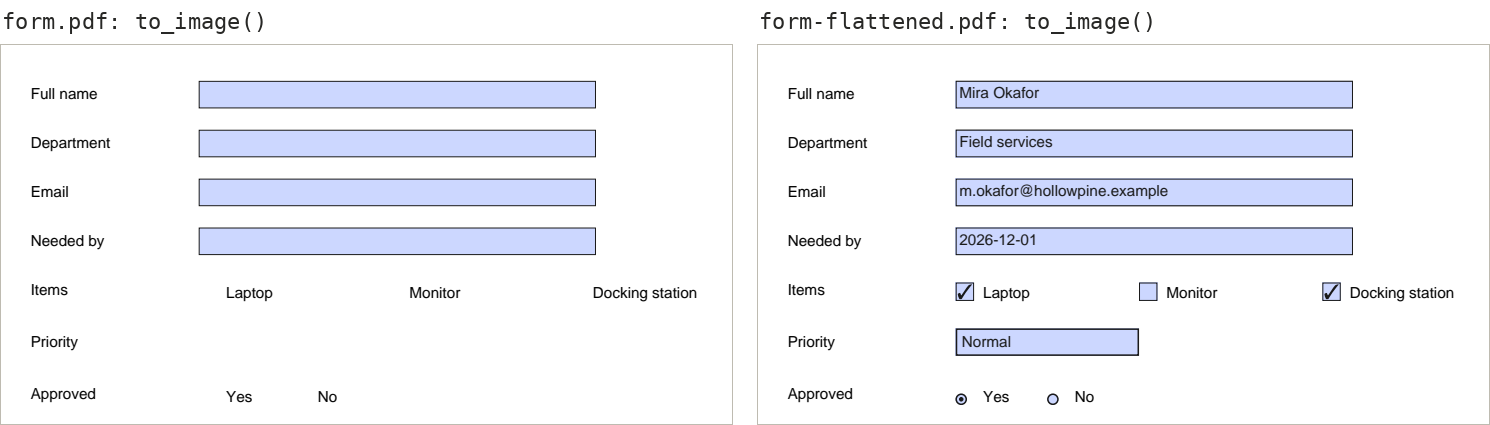
Match fields to their labels
Field names are chosen by whoever built the form, and are often useless (Text1, Check Box7). The labels people read are printed on the page next to each field. page.annots gives every widget’s position, so the label can be read from the page beside it:
import pdfplumber
from pdfplumber.utils.pdfinternals import resolve, resolve_and_decode

def field_value(data):
    """Text for text and choice fields; True/False for checkboxes and for each radio option."""
    kind = data.get("FT") or resolve(data["Parent"]).get("FT")
    value = data.get("V", resolve(data["Parent"]).get("V") if "Parent" in data else None)
    value = resolve_and_decode(value) if value is not None else None
    if kind.name == "Btn" and "Parent" not in data:          # checkbox
        return value not in (None, "Off")
    if kind.name == "Btn":                                    # one option of a radio group
        return data["AS"].name != "Off"
    return value

with pdfplumber.open("samples/form.pdf") as pdf:
    page = pdf.pages[0]
    form = {}
    for annot in page.annots:
        data = annot["data"]
        if data.get("Subtype").name != "Widget":
            continue
        # The printed label: words on the same line, left of the field (or right, for tick boxes)
        left = page.crop((40, annot["top"], annot["x0"] - 1, annot["bottom"])).extract_text()
        right = page.crop((annot["x1"] + 1, annot["top"], annot["x1"] + 110, annot["bottom"])).extract_words()
        label = left if left and not right else right[0]["text"] if right else left
        name = resolve_and_decode(data.get("T") or resolve(data["Parent"]).get("T"))
        form.setdefault(name, []).append((label, field_value(data)))

for name, entries in form.items():
print(f"{name:12} {entries}")full_name [('Full name', 'Mira Okafor')]
department [('Department', 'Field services')]
email [('Email', 'm.okafor@hollowpine.example')]
needed_by [('Needed by', '2026-12-01')]
item_laptop [('Laptop', True)]
item_monitor [('Monitor', False)]
item_dock [('Docking', True)]
priority [('Priority', 'Normal')]
approved [('Yes', True), ('No', False)]The function also turns values into types: True/False for checkboxes, and for radio buttons, which of the group’s options is selected (each option is its own widget, with the group’s name on its parent). Labels sit to the left of text fields and to the right of tick boxes on this form; adjust the two crops to your layout.
Flattened forms
Forms often arrive flattened: printed to PDF, or processed by a workflow that “locks” them. The fields are gone and the values have become ordinary page content. Our flattened copy was made from the same form with pikepdf. Text values are now normal text, so reading them works like any label–value layout. Checkboxes and radio buttons have become drawings, so their state has to be read from the graphics:
import pdfplumber

def right_of(page, label):
    hit = page.search(label, regex=False)[0]
    return page.crop((hit["x1"] + 1, hit["top"] - 2, page.width, hit["bottom"] + 2)).extract_text()

def ticked(page, box):
    """A box counts as ticked if something smaller is drawn inside it."""
    x0, top, x1, bottom = box
    inside = [o for o in page.curves + page.rects + page.chars
              if o["x0"] >= x0 and o["x1"] <= x1 and o["top"] >= top and o["bottom"] <= bottom
              and o["width"] < (x1 - x0) - 1]
    return bool(inside)

with pdfplumber.open("samples/form-flattened.pdf") as pdf:
    page = pdf.pages[0]
    print("fields left:", len(page.annots))
    print({label: right_of(page, label) for label in ["Full name", "Department", "Needed by", "Priority"]})

    # Small squares and circles are tick boxes and radio buttons; the word to the right is the label
    boxes = {(round(o["x0"]), round(o["top"]), round(o["x1"]), round(o["bottom"]))
             for o in page.rects + page.curves if 6 < o["width"] < 15 and abs(o["width"] - o["height"]) < 1}
    inside_another = {b for b in boxes for o in boxes
                      if o != b and o[0] <= b[0] and o[1] <= b[1] and b[2] <= o[2] and b[3] <= o[3]}
    for box in sorted(boxes - inside_another, key=lambda b: (b[1], b[0])):   # the tick marks are squares too
        label = page.crop((box[2] + 1, box[1] - 2, box[2] + 120, box[3] + 2)).extract_words()[0]["text"]
print(f"{label:8} {'[x]' if ticked(page, box) else '[ ]'}")fields left: 0
{'Full name': 'Mira Okafor', 'Department': 'Field services', 'Needed by': '2026-12-01', 'Priority': 'Normal'}
Laptop [x]
Monitor [ ]
Docking [x]
Yes [x]
No [ ]The rule is simple: a box is ticked when something smaller is drawn inside it, such as a tick, a cross or a dot. The tick marks are small squares themselves, which is why boxes inside other boxes are dropped first. The result matches the live form exactly: Laptop and Docking station ticked, Monitor not, Approved: Yes.
Signature fields, dates and XFA
- Signature fields are widgets too. pdfplumber reports their position, but not whether a signature is valid; use a PDF signing library for that.
- Dates are stored as typed, as text; parse them yourself.
- XFA forms (dynamic forms from Adobe LiveCycle) keep their data in XML inside the PDF, not in AcroForm fields, and many have no page content at all until a viewer renders them. pdfplumber cannot read them;
pdf.doc.catalog["AcroForm"]may contain anXFAentry, which is how to recognise them.