Tables
Table not detected, or detected wrong
Table problems come down to three things: the finder saw no edges, the edges did not meet, or the text inside the cells was read badly. A ten-line function tells you which one you have; the table below maps each symptom to the setting that fixes it.
Short answer
Ask the table finder what it saw before changing any settings:
import pdfplumber

def why_no_table(page, settings=None):
    """Explain what the table finder saw, step by step."""
    if not page.chars:
        return "no text on the page: scanned image? run OCR first"
    finder = page.debug_tablefinder(settings or {})
    v = [e for e in finder.edges if e["orientation"] == "v"]
    h = [e for e in finder.edges if e["orientation"] == "h"]
    counts = f"{len(v)} vertical / {len(h)} horizontal edges, {len(finder.intersections)} intersections, {len(finder.tables)} table(s)"
    if finder.tables:
        return counts + " -> table found"
    if not v and not h:
        return counts + " -> nothing ruled: use the text or explicit strategy"
    if not v:
        return counts + " -> columns are not ruled: vertical_strategy='text' or explicit lines"
    if not h:
        return counts + " -> rows are not ruled: horizontal_strategy='text' or explicit lines"
    return counts + " -> lines do not meet: raise intersection/join/snap tolerance"

for name in ["invoice", "bank-statement", "borderless-table", "scanned-invoice"]:
    with pdfplumber.open(f"samples/{name}.pdf") as pdf:
print(f"{name:17} {why_no_table(pdf.pages[0])}")invoice 6 vertical / 9 horizontal edges, 54 intersections, 1 table(s) -> table found
bank-statement 0 vertical / 24 horizontal edges, 0 intersections, 0 table(s) -> columns are not ruled: vertical_strategy='text' or explicit lines
borderless-table 0 vertical / 0 horizontal edges, 0 intersections, 0 table(s) -> nothing ruled: use the text or explicit strategy
scanned-invoice no text on the page: scanned image? run OCR firstNo text means a scanned page (run OCR). Edges in only one direction means that direction needs "text" or explicit lines. Edges in both directions with no table means they do not quite meet: raise a tolerance. For a picture of the same information, call page.to_image().debug_tablefinder() (visual debugging).
Symptom → cause → fix
Every row below was reproduced on one of the site’s sample PDFs or on the FBI table from pdfplumber’s test suite. Follow the link for the figure and code.
| What you see | Cause | Fix |
|---|---|---|
extract_table() returns None on a table with no lines |
No edges at all | "vertical_strategy": "text", "horizontal_strategy": "text", or explicit lines. Borderless tables |
None when only rows are ruled (statements, ledgers) |
Horizontal edges only: 0 intersections | "vertical_strategy": "text" or explicit column lines. Tutorial step 6 |
| Several records crammed into one cell | Rules only every few rows (banding) | "horizontal_strategy": "text". NICS example |
Extra columns full of None |
Rules drawn a few points apart in different rows | Raise snap_tolerance. Figure |
| No table where rules have small gaps | Segments stop short of crossings | Raise join_tolerance or intersection_tolerance. Figure |
| No table with dashed or dotted rules | Dash segments shorter than 1 pt are pre-filtered | Lower edge_min_length_prefilter (0.11.8+). Figure |
| Header or footer row comes out as one wide cell | Inner rules stop before the border | Raise intersection_tolerance. Figure |
A word is split across two columns (Lark / spur) |
Text strategy found an accidental alignment | Raise min_words_vertical, or use explicit columns. Below |
| First or last column missing with the text strategy | Inferred row edges do not reach the outer columns | Explicit lines for both directions. Borderless tables |
Letters doubled in cells (AAsssseett) |
Fake-bold text drawn twice | page.dedupe_chars() before extracting. Below |
| Words run together inside cells | Gaps smaller than the word tolerance | Lower text_x_tolerance or set text_x_tolerance_ratio. Extract text |
Merged header cells come out as None |
Spanning cells are reported once, at the top-left | Fill them in afterwards. Merged cells |
| Table found but rows are in a strange order on the page | Several tables, sorted by position | Use find_tables() and sort by table.bbox. Extract tables |
| Nothing at all, and no text either | Scanned page: the “table” is a picture | OCR first. Scanned PDFs |
Only horizontal rules
Bank statements, invoices and ledgers often rule the rows but not the columns. The finder gets plenty of horizontal edges and no vertical ones, so there is nowhere for them to cross:
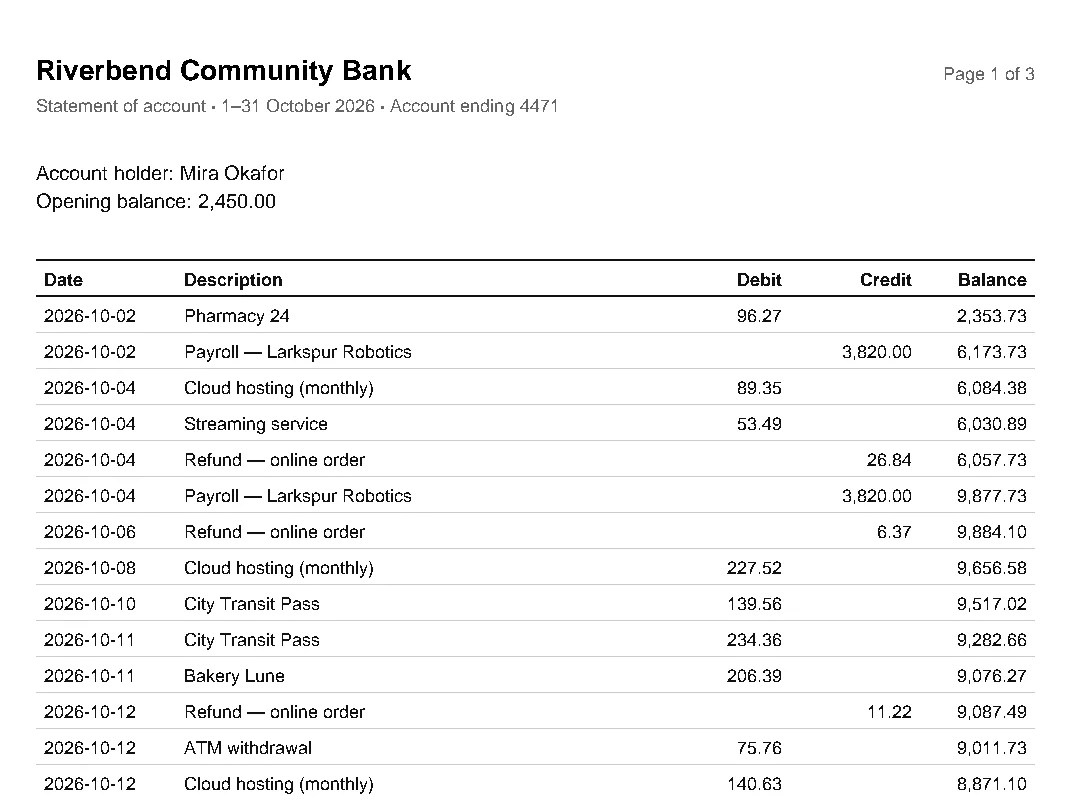
Give the columns another source of edges: "vertical_strategy": "text", or explicit x positions taken from the header row. The tutorial walks through both and shows why explicit columns are more reliable.
A word split across columns
The text strategy turns any x position where at least three words line up (min_words_vertical, default 3) into a column boundary. In a long list, three descriptions that happen to have a word starting at the same x are enough:
import pdfplumber

with pdfplumber.open("samples/bank-statement.pdf") as pdf:
    page = pdf.pages[0]
    settings = {"vertical_strategy": "text", "horizontal_strategy": "lines"}
    print(page.extract_table(settings)[2])           # 'Lark' | 'spur Robotics'
    settings["min_words_vertical"] = 5               # demand stronger alignment
print(page.extract_table(settings)[1])['2026-10-02', 'Payroll — Lark', 'spur Robotics', '', '3,820.00', '6,173.73']
['2026-10-02', 'Payroll — Larkspur Robotics', '', '3,820.00', '6,173.73']Requiring five aligned words removed the phantom boundary here, but the header row dropped out of the table at the same time, and from 7 a real column disappears. Check the header row after every change, or place the columns explicitly instead.
Doubled letters in cells
When a header is “bolded” by drawing it twice, slightly offset, both copies land in the cell:
import pdfplumber

with pdfplumber.open("samples/framed-table.pdf") as pdf:
    page = pdf.pages[0]
    print(page.extract_table()[0])                  # header drawn twice (fake bold)
print(page.dedupe_chars().extract_table()[0]) # remove the overprinted copies first['AAsssseett', 'BBoorrrroowweerr', 'DDuuee bbaacckk']
['Asset', 'Borrower', 'Due back']dedupe_chars() returns a page without the overprinted copies, and every method works on that page as usual. See missing spaces and doubled letters for the tolerance options.
Try it on your table
Pick a sample with a known problem, or open your own PDF. The Lab shows the vertical and horizontal edge counts and suggests which setting to change:
Table Settings Lab
Drop a PDF here or choose a sample above.
Text-based PDFs work best. Scanned pages have nothing for pdfplumber to read until OCR adds a text layer.
Text and objects
Run pdfplumber to see extract_text() for this page.
Table Settings Lab
Explicit lines: none
table_settings = # defaults
Run pdfplumber to detect tables.
Crop and coordinates
Drag a rectangle on the page. pdfplumber's coordinates are in points from the top-left corner: (x0, top, x1, bottom).
Drag a box on the page to measure it.
PDF Doctor
Checks why extraction might fail: missing text layer, (cid:x) fonts, duplicated characters, rotation and ruling lines.