Troubleshooting
Missing spaces and doubled letters
pdfplumber decides where words end by measuring the gaps between characters. When a PDF's gaps are unusual, words merge, split or appear twice. Every one of these problems can be measured, and once measured, fixed with one setting.
Short answer
| What you see | Cause | Fix |
|---|---|---|
datesandthenameofeachinspector |
Word gaps under x_tolerance (3 pt) and no space characters |
x_tolerance=1.5, or x_tolerance_ratio=0.15 for mixed sizes |
S U M M A R Y |
Letter spacing wider than 3 pt | Higher x_tolerance for that region only |
TToottaall |
Text drawn twice (fake bold), copies within 1 pt | page.dedupe_chars() |
AAnnnnuuaall that dedupe_chars() does not fix |
Copies more than 1 pt apart (a drop shadow) | dedupe_chars(tolerance=2), or filter the copy out by colour |
The text extraction guide introduces the first three. This page shows how to measure what your PDF is doing, and the cases those fixes miss.
The sample here is spacing-cases.pdf: a heading with a grey drop shadow, and a justified paragraph drawn word by word with no space characters, as typesetting and design software often produce. With default settings:
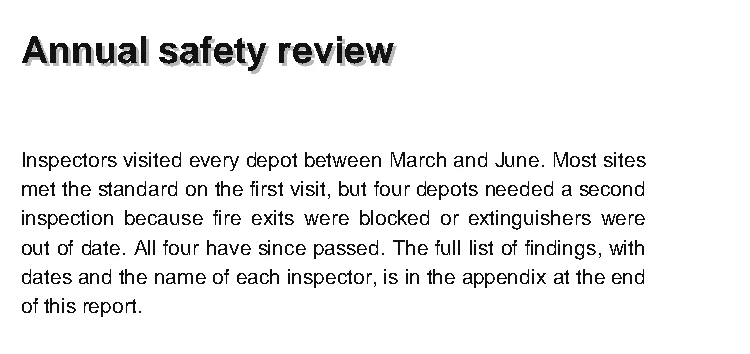
Why only some lines merge
In justified text, the space between words changes from line to line, because each line is stretched to the same width. Measure it. Grouping the characters with a tiny tolerance and looking at the gaps between neighbours shows two clusters, letters (about 0 pt apart) and words:
from collections import Counter

import pdfplumber

with pdfplumber.open("samples/spacing-cases.pdf") as pdf:
    page = pdf.pages[0].crop((50, 100, 400, 220))           # the justified paragraph
    for n, line in enumerate(page.extract_text_lines(x_tolerance=0.5), 1):
        chars = sorted(line["chars"], key=lambda c: c["x0"])
        gaps = [round(b["x0"] - a["x1"], 1) for a, b in zip(chars, chars[1:])]
        word_gaps = sorted(g for g in gaps if g > 0.5)
        span = f"{word_gaps[0]}" if word_gaps[0] == word_gaps[-1] else f"{word_gaps[0]}-{word_gaps[-1]}"
        letters = max(g for g in gaps if g <= 0.5)
print(f"line {n}: words {span} pt apart, letters {letters} pt {line['text'][:28]}")line 1: words 3.0 pt apart, letters 0.0 pt Inspectors visited every dep
line 2: words 3.1 pt apart, letters 0.0 pt met the standard on the firs
line 3: words 4.6 pt apart, letters 0.0 pt inspection because fire exit
line 4: words 3.2 pt apart, letters 0.0 pt out of date. All four have s
line 5: words 2.9 pt apart, letters 0.0 pt dates and the name of each i
line 6: words 2.8 pt apart, letters 0.0 pt of this report.pdfplumber starts a new word when the gap is more than x_tolerance, which defaults to 3 points. Lines 1 to 4 have word gaps of 3.0 to 4.6 points and come out right. Lines 5 and 6, at 2.9 and 2.8 points, fall just under the threshold and merge: in the overlay above, each is a single word box. This is why the problem appears on some pages, or some lines, and not others.
Any tolerance between the largest letter gap and the smallest word gap works. Here the letters touch (0 pt) and the closest words are 2.8 pt apart, so anything from a few tenths up to 2.8 works:
import json

import pdfplumber

truth = json.load(open("samples/truth/spacing-cases.json"))["lines"]

with pdfplumber.open("samples/spacing-cases.pdf") as pdf:
    page = pdf.pages[0].crop((50, 100, 400, 220))
    for kwargs in [{}, {"x_tolerance": 1.5}, {"x_tolerance_ratio": 0.15}]:
        lines = page.extract_text(**kwargs).splitlines()
        print(f"{str(kwargs or 'defaults'):28} {sum(a == b for a, b in zip(lines, truth))}/{len(truth)} lines right"
f" last line: {lines[-1]!r}")defaults 4/6 lines right last line: 'ofthisreport.'
{'x_tolerance': 1.5} 6/6 lines right last line: 'of this report.'
{'x_tolerance_ratio': 0.15} 6/6 lines right last line: 'of this report.'Both fixes get all six lines right, checked against the text the sample was made from. Use x_tolerance_ratio when the page mixes type sizes: it multiplies each character’s size, so 0.15 means 1.5 points for 10 pt body text and 0.75 points for 5 pt footnotes. The same settings work for extract_words(), search() and table extraction (as text_x_tolerance).
Find affected pages in a batch
Merged words are long. Flagging any “word” of 20 characters or more finds them quickly across many files:
import pdfplumber

def suspicious_words(page, longest=20):
    """Words that are probably several words run together."""
    return [w["text"] for w in page.extract_words() if len(w["text"]) >= longest]

for name in ["samples/spacing-cases.pdf", "samples/text-quirks.pdf", "samples/report.pdf"]:
    with pdfplumber.open(name) as pdf:
        for page in pdf.pages:
            found = suspicious_words(page)
            if found:
                print(f"{name} p{page.page_number}: {len(found)} suspicious, e.g. {found[0][:40]}")
page.close()samples/spacing-cases.pdf p1: 1 suspicious, e.g. datesandthenameofeachinspector,isintheap
samples/text-quirks.pdf p1: 2 suspicious, e.g. Quarterlyrevenueroseineveryregion.
samples/report.pdf p1: 1 suspicious, e.g. pdfplumber.dev/cookbook/The third hit is a false positive: a URL is legitimately long. Use the check to pick pages to look at, or to choose a tolerance per document source, not to change text automatically.
Doubled letters from a drop shadow
The heading is drawn twice: a grey copy 1.5 points down and to the right, then the black text on top. pdfplumber reports both, so every letter appears twice. dedupe_chars() removes characters that repeat the same text, font and size within tolerance, which defaults to 1 point. The shadow is further away than that:
import pdfplumber

with pdfplumber.open("samples/spacing-cases.pdf") as pdf:
    page = pdf.pages[0]
    first_line = lambda p: p.extract_text().splitlines()[0]
    print("as extracted       :", first_line(page))
    print("dedupe_chars()     :", first_line(page.dedupe_chars()))       # copies are 1.5 pt apart
    kept = page.dedupe_chars(tolerance=2)
    print("dedupe tolerance=2 :", first_line(kept), "- kept colour", kept.chars[0]["non_stroking_color"])

    grey = (0.721569, 0.721569, 0.721569)                               # the shadow's colour
    no_shadow = page.filter(lambda o: o.get("non_stroking_color") != grey or o["object_type"] != "char")
print("shadow filtered out:", first_line(no_shadow))as extracted : AAnnnnuuaall ssaaffeettyy rreevviieeww
dedupe_chars() : AAnnnnuuaall ssaaffeettyy rreevviieeww
dedupe tolerance=2 : Annual safety review - kept colour (0.066667, 0.066667, 0.066667)
shadow filtered out: Annual safety reviewWith tolerance=2, the copies merge. Which one survives matters if you later filter by colour: dedupe_chars() keeps the copy nearest the top of the page, then the leftmost, not the one drawn first. Here that is the black text, because the shadow sits below and to the right, which is how shadows are usually drawn. When in doubt, filter the shadow out by its colour instead, as in the last line: that is explicit and keeps the real text whatever the geometry.
Fake bold (text drawn twice a fraction of a point apart) is the same problem with smaller offsets, and the default dedupe_chars() handles it (example). Text thickened by stroking the outline instead is invisible to pdfplumber’s characters and causes no duplicates (bold and italic).
Letters spread out: S U M M A R Y
The opposite problem comes from letter-spaced headings, where each letter is more than 3 points from the next. Raising x_tolerance for the whole page would merge real words in the body text, so raise it only for the heading’s region: crop to the heading and extract that with a larger value (example). For a heading that appears in the same place on every page, a fixed crop is enough; otherwise find it with search or by font size first.
Still wrong?
- Spaces exist but text is in the wrong order: a reading-order problem, not spacing (multi-column layouts).
(cid:12)instead of letters: a font encoding problem (cid errors).- Nothing at all: the page is probably a scan (OCR).
- See it yourself: the Playground draws word boxes on your own PDF and lets you change
x_tolerancelive.