Cookbook
Web apps
A PDF upload endpoint is a few lines with pdfplumber, because it opens uploads straight from memory. The other lines are the important ones: limits, errors that tell the user what went wrong, and keeping one slow file from blocking everyone else. Both apps below were run and tested with real uploads, including broken files.
Short answer
pdfplumber.open() takes the uploaded file from memory; no temporary file is needed. Check the size and the first bytes before parsing, and turn pdfplumber’s errors into messages the user can act on. The FastAPI version:
import io

import pdfplumber
from fastapi import FastAPI, File, HTTPException, UploadFile
from pdfplumber.utils.exceptions import PdfminerException

MAX_BYTES = 20 * 1024 * 1024       # refuse uploads over 20 MB
MAX_PAGES = 100

app = FastAPI()

@app.post("/extract")
def extract(file: UploadFile = File(...)):     # plain `def`: FastAPI runs it in a worker thread
    data = file.file.read(MAX_BYTES + 1)
    if len(data) > MAX_BYTES:
        raise HTTPException(413, "File too large")
    if not data.startswith(b"%PDF-"):
        raise HTTPException(415, "Not a PDF")
    try:
        with pdfplumber.open(io.BytesIO(data)) as pdf:
            if len(pdf.pages) > MAX_PAGES:
                raise HTTPException(413, f"More than {MAX_PAGES} pages")
            pages = []
            for page in pdf.pages:
                pages.append({"page": page.page_number,
                              "text": page.extract_text(),
                              "tables": page.extract_tables()})
                page.close()
    except PdfminerException as e:
        raise HTTPException(422, f"Could not read the PDF: {e.args[0]!r}")
    return {"filename": file.filename, "pages": pages}
FastAPI
The endpoint returns the text and tables of every page as JSON. Four decisions in it matter more than the extraction itself:
- Plain
def, notasync def. pdfplumber does its work synchronously and uses the CPU the whole time. In anasync defendpoint it would block the event loop, and every other request would wait. FastAPI runs plaindefendpoints in a thread pool instead. - Limits before parsing. Reading at most
MAX_BYTES + 1bytes caps memory per request; the page limit caps the work. Set both from what your users really upload. - Check the first bytes. A file named
.pdfis often an HTML error page;%PDF-at the start catches that before the parser does, with a clearer message (what broken files look like). - Map parser errors to 422.
PdfminerExceptionwraps whatever went wrong in the file;e.args[0]is the original error, which is what you log.
Test it with FastAPI’s TestClient, which sends real multipart uploads through the app without starting a server:
from fastapi.testclient import TestClient

from fastapi_app import app                    # the app above, saved as fastapi_app.py

client = TestClient(app)
for name in ["invoice.pdf", "broken/html-page.pdf", "broken/truncated-90.pdf", "encrypted.pdf"]:
    with open(f"samples/{name}", "rb") as f:
        r = client.post("/extract", files={"file": (name, f, "application/pdf")})
    body = r.json()
    if r.is_success:
        result = f"{len(body['pages'])} page(s), {sum(len(p['tables']) for p in body['pages'])} table(s)"
    else:
        result = body["detail"]
print(f"{name:24} {r.status_code} {result}")invoice.pdf 200 1 page(s), 1 table(s)
broken/html-page.pdf 415 Not a PDF
broken/truncated-90.pdf 422 Could not read the PDF: PSEOF('Unexpected EOF')
encrypted.pdf 422 Could not read the PDF: PDFPasswordIncorrect()A good PDF returns its page and table; an HTML page renamed to .pdf is refused before parsing; a truncated download and a password-protected file come back as 422 with the reason. Add the broken sample files to your own tests in the same way.
Run it with uvicorn fastapi_app:app (FastAPI’s file uploads need the python-multipart package installed).
Streamlit
Streamlit’s file uploader returns a file-like object that pdfplumber can open directly. One thing to plan for: Streamlit re-runs the whole script on every interaction, so without caching, every click would parse the PDF again. st.cache_data keyed on the file’s bytes keeps one result per distinct file:
import io

import pandas as pd
import pdfplumber
import streamlit as st
from pdfplumber.utils.exceptions import PdfminerException

@st.cache_data                                   # Streamlit re-runs the script on every click;
def read_tables(data: bytes):                    # this keeps one result per distinct file
    with pdfplumber.open(io.BytesIO(data)) as pdf:
        found = []
        for page in pdf.pages:
            found += [(page.page_number, t) for t in page.extract_tables()]
            page.close()
        return len(pdf.pages), found

st.title("PDF tables")
uploaded = st.file_uploader("Upload a PDF", type="pdf")

if uploaded is not None:
    try:
        n_pages, tables = read_tables(uploaded.getvalue())
    except PdfminerException as e:
        st.error(f"Could not read this PDF: {e.args[0]!r}")
    else:
        st.caption(f"{uploaded.name}: {n_pages} page(s), {len(tables)} table(s)")
        for page_number, table in tables:
            st.subheader(f"Page {page_number}")
            st.dataframe(pd.DataFrame(table[1:], columns=table[0]))
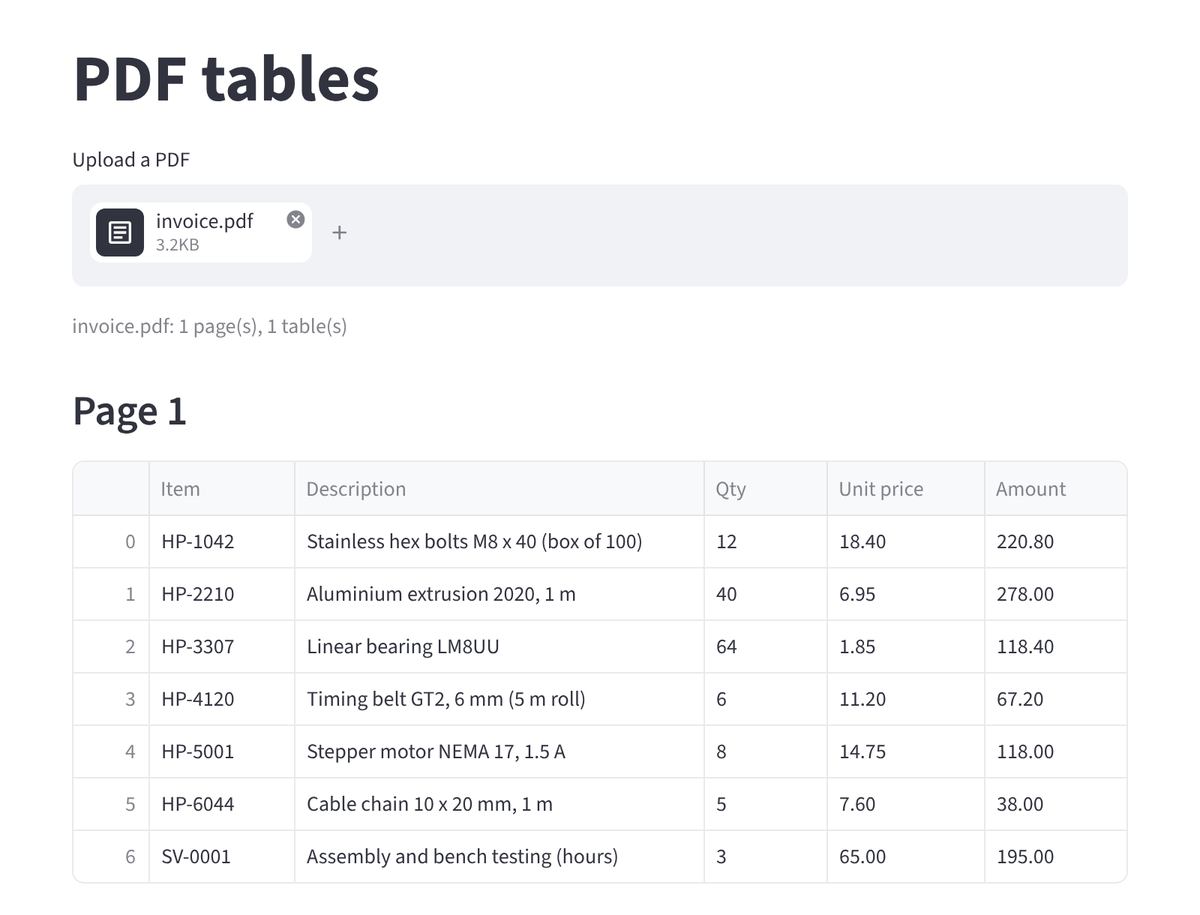
This is the app running in a browser, after uploading invoice.pdf:
Streamlit’s AppTest runs the same script without a browser, uploads files and reads what the app displayed:
from streamlit.testing.v1 import AppTest

for name in ["invoice.pdf", "bank-statement.pdf", "broken/truncated-90.pdf"]:
    at = AppTest.from_file("streamlit_app.py")       # path relative to this test file
    at.run()
    with open(f"samples/{name}", "rb") as f:
        at.file_uploader[0].set_value((name.split("/")[-1], f.read(), "application/pdf"))
    at.run()
    shown = [e.value for e in at.error]
print(f"{name:24} {at.caption[0].value if at.caption else shown[0]}")invoice.pdf invoice.pdf: 1 page(s), 1 table(s)
bank-statement.pdf bank-statement.pdf: 3 page(s), 0 table(s)
broken/truncated-90.pdf Could not read this PDF: PSEOF('Unexpected EOF')The bank statement shows 0 table(s). That is correct for default settings: the statement has no column lines, so the default table finder sees nothing (why, and the fix). A general-purpose upload app will meet such files; showing the text as a fallback, or letting the user choose a table strategy, is a reasonable next step.
Under real traffic
- One process is one core. Python threads do not parse PDFs in parallel (measured). Run several worker processes (
uvicorn --workers 4, or gunicorn with uvicorn workers), or hand large files to a task queue such as Celery or RQ and return a job ID. - Bound the time per file. A malformed PDF can take minutes. Parse in a worker process you can kill after a timeout, rather than in the web process itself.
- Close pages as you go, as both apps do, so memory stays flat on long uploads (why).
- Keep pdfplumber current. Uploaded PDFs are untrusted input, and parser security fixes reach you through pdfplumber’s pinned pdfminer.six version (security).