Cookbook
Bank statements
Bank statements are the friendliest financial documents to extract, because they check themselves: every row carries a running balance. This recipe reads all transactions from a three-page statement, proves each one against that balance, and writes a CSV you can import into accounting software.
Short answer
import csv
import json
from decimal import Decimal

import pdfplumber

COLUMNS = ["Date", "Description", "Debit", "Credit", "Balance"]

def amount(text):
    return Decimal(text.replace(",", "")) if text else Decimal(0)

def column_edges(page):
    head = [w for w in page.extract_words() if w["text"] in COLUMNS]
    gaps = [(a["x1"] + b["x0"]) / 2 for a, b in zip(head, head[1:])]
    return [head[0]["x0"] - 4, *gaps, head[-1]["x1"] + 4]

def read_statement(path):
    with pdfplumber.open(path) as pdf:
        first, last = pdf.pages[0], pdf.pages[-1]
        meta = {
            "period": first.search(r"Statement of account · (.+?) ·")[0]["groups"][0],
            "account": first.search(r"Account ending (\d+)")[0]["groups"][0],
            "opening": amount(first.search(r"Opening balance: ([\d,.]+)")[0]["groups"][0]),
            "closing": amount(last.search(r"Closing balance: ([\d,.]+)")[0]["groups"][0]),
        }
        rows = []
        for page in pdf.pages:
            table = page.extract_table({"vertical_strategy": "explicit",
                                        "explicit_vertical_lines": column_edges(page),
                                        "horizontal_strategy": "lines"})
            rows += [dict(zip(COLUMNS, r)) for r in table if r != COLUMNS]
            page.close()
    return meta, rows

def first_bad_row(meta, rows):
    """Each printed balance must equal the previous one minus debit plus credit."""
    balance = meta["opening"]
    for n, r in enumerate(rows, 1):
        balance += amount(r["Credit"]) - amount(r["Debit"])
        if balance != amount(r["Balance"]):
            return n, r
    return None if balance == meta["closing"] else ("end", "closing balance differs")

meta, rows = read_statement("samples/bank-statement.pdf")
print(meta)
print(len(rows), "transactions; first bad row:", first_bad_row(meta, rows))

with open("statement.csv", "w", newline="", encoding="utf-8") as f:   # one signed amount per row
    out = csv.writer(f)
    out.writerow(["date", "description", "amount", "balance"])
    for r in rows:
        out.writerow([r["Date"], r["Description"], amount(r["Credit"]) - amount(r["Debit"]), amount(r["Balance"])])

truth = json.load(open("samples/truth/bank-statement.json"))["rows"]
print("matches source data:", [list(r.values()) for r in rows] == truth){'period': '1–31 October 2026', 'account': '4471', 'opening': Decimal('2450.00'), 'closing': Decimal('11632.39')}
58 transactions; first bad row: None
matches source data: TrueAll 58 transactions from the three pages of bank-statement.pdf, each one consistent with the running balance, and identical to the data the statement was generated from.
The parts of the recipe
Statement details by pattern. The period, account number and balances are printed as sentences (Opening balance: 2,450.00), so page.search() with a regular expression and a group reads each one directly. The opening balance comes from the first page and the closing balance from the last; neither is typed into the code.
Columns from the header. This statement rules every row but draws no lines between columns, so pdfplumber’s default table finder sees nothing. The header words give the column positions: each boundary goes halfway between two header words. The same function runs on every page, so a page that is laid out slightly differently still gets the right columns:
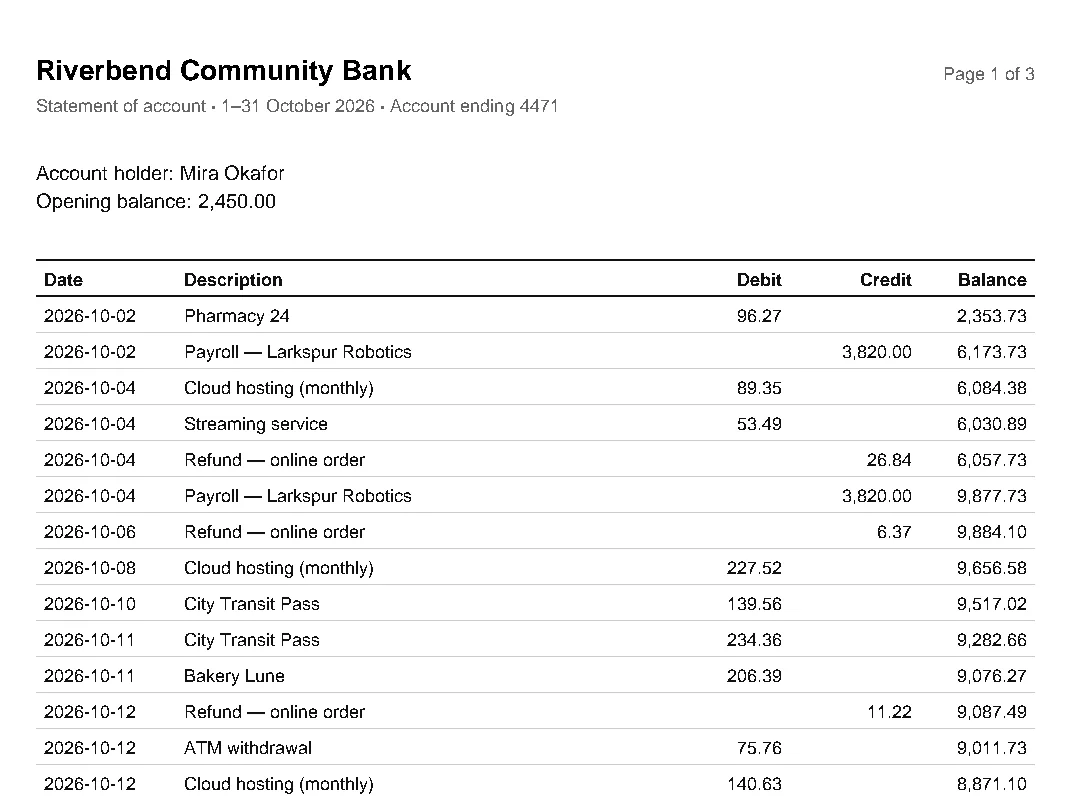
Every page, header dropped. Each page repeats the header row; the comprehension skips it. Pages are closed as they are processed, which keeps memory flat on year-long statements (performance). Statements whose rows break across pages need the continuation recipe.
Decimal amounts. Money is converted with Decimal, so the balance check compares exact values instead of floating-point approximations.
Check every row
first_bad_row() replays the statement: start from the opening balance, apply each row’s credit and debit, and compare with the balance the bank printed on that row. It returns the first row that disagrees, and finally compares the end result with the closing balance.
This check is stronger than comparing totals. If one amount is misread, every later balance disagrees and the check names the exact row to look at; if a debit is read as a credit, it catches that too. It needs nothing but what the statement prints, so it works on any bank’s layout.
Know what it does not check:
from decimal import Decimal

import pdfplumber

amount = lambda s: Decimal(s.replace(",", "")) if s else Decimal(0)

with pdfplumber.open("samples/bank-statement.pdf") as pdf:
    page = pdf.pages[0]
    opening = amount(page.search(r"Opening balance: ([\d,.]+)")[0]["groups"][0])
    # A tempting shortcut: let pdfplumber guess the columns from the text
    header, *rows = page.extract_table({"vertical_strategy": "text", "horizontal_strategy": "lines"})

balance, bad = opening, None
for n, row in enumerate(rows, 1):
    balance += amount(row[-2]) - amount(row[-3])          # credit - debit, the last columns
    if bad is None and balance != amount(row[-1]):
        bad = n
print("columns:", header)
print("running balance check:", "first bad row " + str(bad) if bad else "passes")
split = [r[1:3] for r in rows if r[2]]                     # text in the unnamed column
print(f"descriptions cut in two: {len(split)}, e.g. {split[0]}")columns: ['Date', 'Description', '', 'Debit', 'Credit', 'Balance']
running balance check: passes
descriptions cut in two: 18, e.g. ['Payroll — Lark', 'spur Robotics']Letting pdfplumber guess the columns from the text (vertical_strategy: "text") produces an extra, unnamed column: 18 descriptions are cut in two, such as Payroll — Lark and spur Robotics. The amounts still sit in the last three columns, so the running balance passes. A passing balance check proves the numbers, not the text. Check the columns too: the header row should have exactly the names you expect, with no empty ones. Placing the columns yourself, as in the main recipe, avoids the problem.
CSV for accounting software
Accounting tools usually import one signed amount per transaction rather than separate debit and credit columns. The recipe writes statement.csv that way, credits positive and debits negative. From there pandas summarises the month in a few lines:
import pandas as pd

df = pd.read_csv("statement.csv", parse_dates=["date"])      # written by the previous example
spent = df[df["amount"] < 0].groupby("description")["amount"].agg(["count", "sum"])
print(spent.sort_values("sum").head(5).to_string())
print(f"\nmoney in {df[df.amount > 0].amount.sum():,.2f}, out {-df[df.amount < 0].amount.sum():,.2f}") count sum
description
Rent — October 3 -4350.00
Cloud hosting (monthly) 5 -698.44
City Transit Pass 5 -652.16
Pharmacy 24 5 -630.80
Restaurant Saffron 3 -547.24
money in 19,190.94, out 10,008.55Money in minus money out plus the opening balance gives the printed closing balance, 11,632.39: one more cross-check, this time on the exported file.
Scanned statements
Older statements and photographed ones have no text layer. Add one with OCR first (scanned PDFs), then run the same recipe. After OCR, ruling lines are pixels rather than drawn lines, so replace "horizontal_strategy": "lines" with row positions from the text, as in tables after OCR. OCR misreads digits often enough (8 for 3, a dropped decimal point) that the row-by-row balance check stops being optional: it is how you find them.