Tables
Extract tables from PDFs
pdfplumber finds tables from the lines drawn on the page, or from how text lines up when there are no lines. This page shows the four table methods, how detection works step by step, and a real government table that needs tuning.
Short answer
Loop over the pages and call extract_tables(). Each table is a list of rows; each row is a list of strings (or None for cells that span from a neighbour):
import pdfplumber

with pdfplumber.open("samples/report.pdf") as pdf:
    for page in pdf.pages:
        for i, table in enumerate(page.extract_tables(), start=1):
            print(f"page {page.page_number}, table {i}: {len(table)} rows x {len(table[0])} cols")
print(" first rows:", table[:2])page 1, table 1: 15 rows x 3 cols
first rows: [['Site', 'Result', 'Reading (ppb)'], ['Site 01', 'Pass', '3.9']]
page 2, table 1: 35 rows x 3 cols
first rows: [['Site', 'Result', 'Reading (ppb)'], ['Site 15', 'Pass', '4.4']]That works out of the box when the table has ruling lines on both axes, like report.pdf. If yours has no lines, or only horizontal ones, see table_settings and borderless tables.
The four table methods
| Method | Returns | Use it when |
|---|---|---|
page.extract_table() |
the largest table as list[list[str | None]], or None |
the page has one table |
page.extract_tables() |
a list of those, one per table | the page has several tables |
page.find_table() |
the largest Table object, or None |
you also need its position |
page.find_tables() |
a list of Table objects |
you need positions, cells, or to crop around tables |
“Largest” means most cells (ties go to the table higher up, then further left). All four accept the same table_settings dictionary. A Table object gives you its geometry as well as its content:
import pdfplumber

with pdfplumber.open("samples/invoice.pdf") as pdf:
    page = pdf.pages[0]

    rows = page.extract_table()          # largest table -> list of rows (or None)
    every = page.extract_tables()        # every table -> list of tables
    table = page.find_table()            # largest table -> Table object (or None)
    found = page.find_tables()           # every table -> list of Table objects

    print(type(rows).__name__, len(rows), "rows |", len(every), "table(s)")
    print("bbox:", tuple(round(v, 1) for v in table.bbox))
    print("cells:", len(table.cells), "| rows:", len(table.rows), "| columns:", len(table.columns))
    print("first cell bbox:", tuple(round(v, 1) for v in table.rows[0].cells[0]))
print(table.extract()[0])list 8 rows | 1 table(s)
bbox: (54.0, 250.0, 558.0, 426.0)
cells: 40 | rows: 8 | columns: 5
first cell bbox: (54.0, 250.0, 120.0, 272.0)
['Item', 'Description', 'Qty', 'Unit price', 'Amount']table.cells is a list of (x0, top, x1, bottom) boxes, table.rows and table.columns group them, and table.extract() reads the text in each cell. The bounding box is what you need to crop around a table or remove its text from the page text.
How table detection works
Understanding the four steps makes every setting on the table_settings page obvious. Toggle the layers to walk through them on the sample invoice:
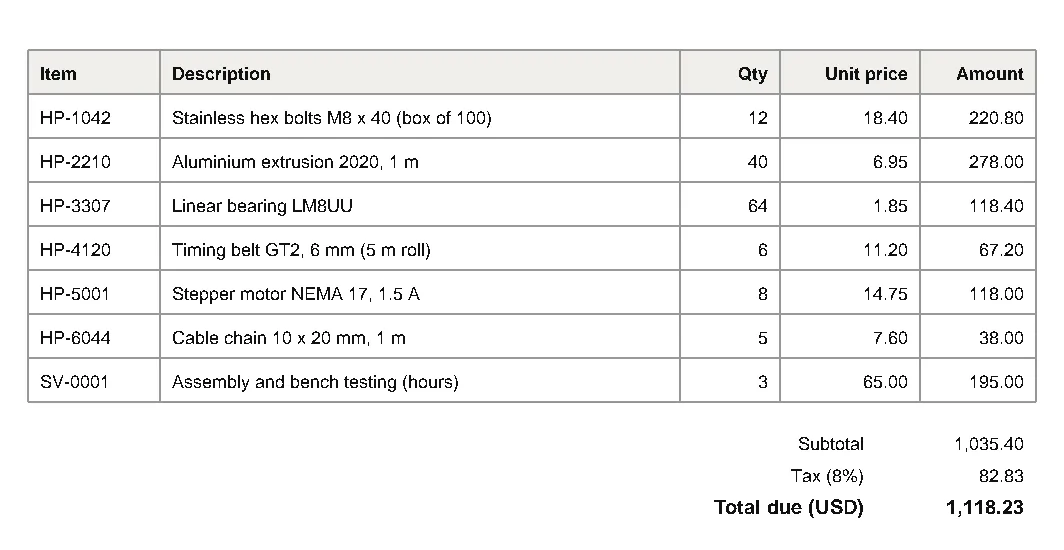
- Find edges. With the default
"lines"strategy, every drawn line and every side of every rectangle becomes a candidate edge. With"text", edges are inferred from words that line up. With"explicit", you supply them. - Clean up edges. Edges that nearly line up are snapped together (
snap_tolerance, 3 pt), collinear pieces with small gaps are joined (join_tolerance, 3 pt), and short fragments are dropped (edge_min_length, 3 pt). - Find intersections. Wherever a vertical and a horizontal edge cross (within
intersection_tolerance, 3 pt), there is a corner. - Build cells and tables. Each set of four corners that encloses a rectangle becomes a cell. Cells that share corners are grouped into one table, and the text inside each cell becomes its value.
Because everything starts from edges, the most common failure is simple: no edges, no table. That is why a borderless table, or one ruled only horizontally like the bank statement in the tutorial, returns nothing until you change the strategy.
A real table that needs tuning
The FBI’s monthly NICS firearm background check report is a classic test file (it ships with pdfplumber’s own test suite). Its rows are only ruled every five states, so with default settings each cell holds five states at once:
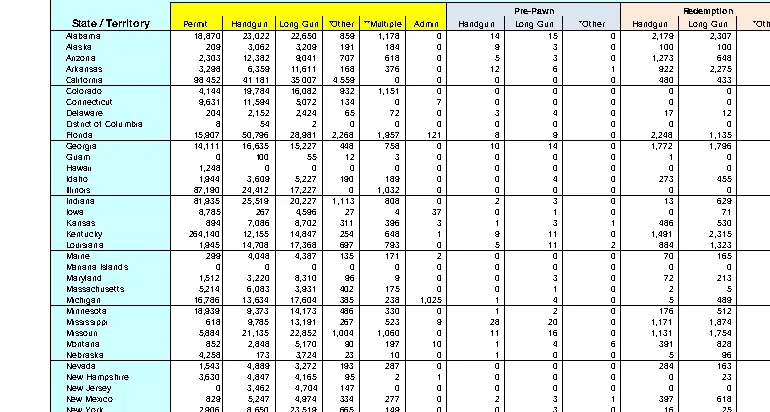
Switching rows to the "text" strategy, and allowing a looser intersection tolerance so the state-name column still meets the vertical rules, gives one row per state. These settings come from the example notebook in the official repository:
import pdfplumber

# FBI NICS firearm checks, November 2015 (US government work, public domain)
with pdfplumber.open("samples/real/nics-background-checks-2015-11.pdf") as pdf:
    page = pdf.pages[0]

    default = page.extract_table()
    print("defaults:", len(default), "rows; one cell holds", default[3][0].count("\n") + 1, "states")

    settings = {
        "vertical_strategy": "lines",
        "horizontal_strategy": "text",    # rows from text lines, not the banded rules
        "snap_y_tolerance": 5,
        "intersection_x_tolerance": 15,
    }
    table = page.extract_table(settings)
    rows = table[4:4 + 56]                # Alabama ... Totals
    print("tuned:", len(rows), "data rows x", len(rows[0]), "columns")
    for row in rows[:3] + rows[-1:]:
print(row[:5])defaults: 17 rows; one cell holds 5 states
tuned: 56 data rows x 25 columns
['Alabama', '18,870', '23,022', '22,650', '859']
['Alaska', '209', '3,062', '3,209', '191']
['Arizona', '2,303', '12,382', '9,041', '707']
['Totals', '804,006', '671,330', '636,903', '26,597']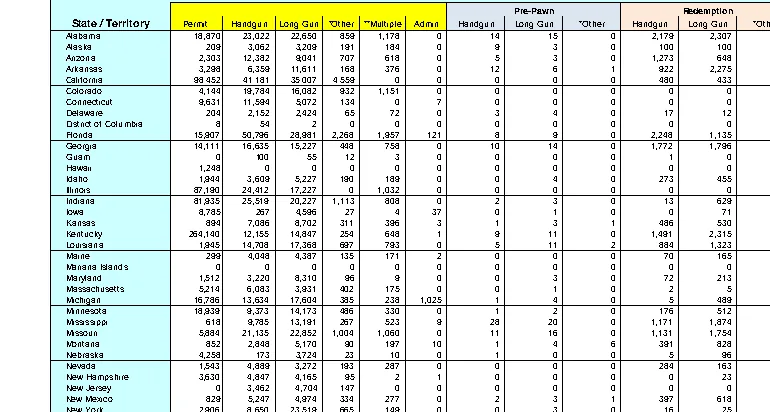
Text and tables together
The most-viewed pdfplumber question on Stack Overflow (about 49,000 views) asks how to get a page’s text and its tables at the same time, without the table text appearing twice. Find the tables, read the text outside them line by line, then merge both by vertical position:
import pdfplumber

with pdfplumber.open("samples/report.pdf") as pdf:
    page = pdf.pages[0]
    tables = page.find_tables()
    boxes = [t.bbox for t in tables]

    def not_in_table(obj):
        return not any(b[0] <= obj["x0"] and obj["x1"] <= b[2] and
                       b[1] <= obj["top"] and obj["bottom"] <= b[3] for b in boxes)

    # Text lines outside tables, plus one entry per table, in page order
    blocks = [(line["top"], "text", line["text"])
              for line in page.filter(not_in_table).extract_text_lines()]
    blocks += [(t.bbox[1], "table", t.extract()) for t in tables]

    for top, kind, content in sorted(blocks, key=lambda b: b[0]):
        if kind == "table":
            print(f"[table: {len(content)} rows, header {content[0]}]")
        else:
print(content)Hollow Pine Supply Co. · Annual inspection report 2026
Annual inspection report
1. Summary
Forty-eight sites were inspected between March and September 2026. Most sites passed; sites marked Follow-up
need a second visit before 31 December 2026.
Overall status: 11 sites need follow-up (see table below).
Methodology: pdfplumber.dev/cookbook/
2. Results by site
[table: 15 rows, header ['Site', 'Result', 'Reading (ppb)']]
Table continues on the next page.
1The result keeps the document order: headings, paragraphs, then the table where it sits on the page. This is also the basis of table-aware chunking for RAG.
Find a heading, then the table under it
Another frequent task (about 35,000 views on Stack Overflow): search for some text, note the page, and extract the table that follows it. page.search() returns the match with its position, so “the table under this heading” is a comparison of top values:
import pdfplumber

with pdfplumber.open("samples/report.pdf") as pdf:
    for page in pdf.pages:
        hits = page.search("Results by site")
        if not hits:
            continue
        heading_bottom = hits[0]["bottom"]
        # The first table that starts below the heading
        below = [t for t in page.find_tables() if t.bbox[1] > heading_bottom]
        table = min(below, key=lambda t: t.bbox[1])
        print("heading found on page", page.page_number)
        print(table.extract()[:4])
breakheading found on page 1
[['Site', 'Result', 'Reading (ppb)'], ['Site 01', 'Pass', '3.9'], ['Site 02', 'Pass', '11.9'], ['Site 03', 'Pass', '7.2']]Check the result before you trust it
Table extraction can look right and still be subtly wrong: a split column, a merged row, a cell read as empty. A few assertions catch most of it:
import pdfplumber

with pdfplumber.open("samples/invoice.pdf") as pdf:
    page = pdf.pages[0]
    header, *rows = page.extract_table()
    text = page.extract_text()

# 1. Every row has the same number of cells
assert all(len(r) == len(header) for r in rows)

# 2. No unexpected empty cells
empty = [(i, j) for i, r in enumerate(rows) for j, c in enumerate(r) if not c]
print("empty cells:", empty)

# 3. Numbers add up to the printed subtotal
amounts = [float(r[4].replace(",", "")) for r in rows]
printed = float(text.split("Subtotal")[1].split()[0].replace(",", ""))
print(f"sum of rows {sum(amounts):,.2f} vs printed subtotal {printed:,.2f}")empty cells: []
sum of rows 1,035.40 vs printed subtotal 1,035.40Totals that appear on the page are the best test you have: if the extracted rows add up to the printed total, the table came out right.