Text
Two-column and multi-column PDFs
On a two-column page, extract_text() reads straight across both columns and stitches unrelated half-sentences together. The fix is geometric: find the white gutter between the columns, read each side separately, and keep full-width titles out of the split. Tested against the source text of our sample article.
Short answer
Crop the page into columns and read them left to right. For a symmetric two-column layout, the page midpoint is enough:
import pdfplumber

with pdfplumber.open("samples/two-column.pdf") as pdf:
    page = pdf.pages[1]                                   # page 2: columns only
    body = page.crop((0, 50, page.width, page.height - 45))  # drop header/footer
    mid = page.width / 2
    left = body.crop((0, body.bbox[1], mid, body.bbox[3]))
    right = body.crop((mid, body.bbox[1], page.width, body.bbox[3]))
    text = left.extract_text() + "\n" + right.extract_text()

print(text.splitlines()[0])
print(text.splitlines()[-1])8 columns and is ruled only between rows, so the
sites and 7 readings above the action level, set out in aWhen the columns are not centred, or there are three of them, detect the gutter instead.
Why the columns get mixed up
extract_text() builds lines by vertical position across the whole page. A line in the left column and the line level with it in the right column share the same top, so they become one line of output:
import pdfplumber

with pdfplumber.open("samples/two-column.pdf") as pdf:
    lines = pdf.pages[0].extract_text().splitlines()

for line in lines[3:6]:
print(line)Municipal water systems publish quality reports every page 2. The table has 8 columns and is ruled only
year, but the numbers rarely travel far beyond the PDF. between rows, so the column positions have to come
Analysts who want to compare lead levels across towns from the header. Note 3 in our log records that the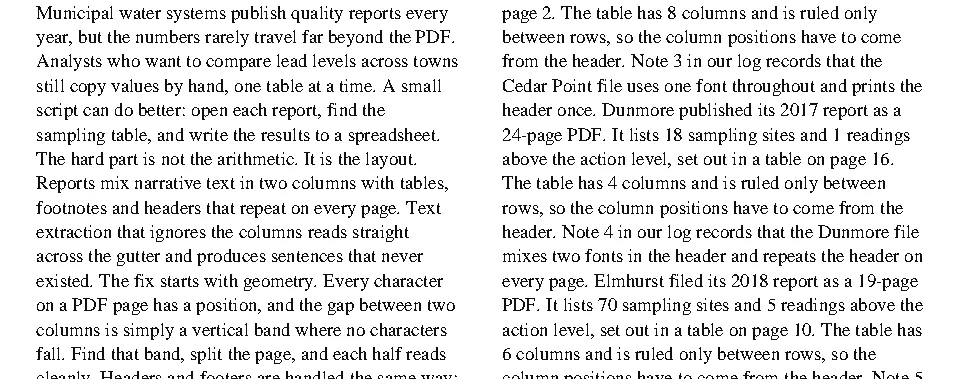
layout=True does not help here: it keeps the visual position of each line but still reads across. The answer is to stop pdfplumber from seeing both columns at once.
Find the gutter automatically
The gutter is a vertical band, running the full height of the text, where no character falls. Count how many characters cover each 1-point slice of the page, and look for runs of zeros at least 10 points wide:
import math
import pdfplumber

def find_gutters(region, min_width=10):
    """x positions of vertical white-space bands at least `min_width` points wide."""
    covered = [0] * (math.ceil(region.bbox[2]) + 2)
    for c in region.chars:
        for x in range(math.floor(c["x0"]), math.ceil(c["x1"])):
            covered[x] += 1
    left = math.floor(min(c["x0"] for c in region.chars))
    right = math.ceil(max(c["x1"] for c in region.chars))
    gutters, start = [], None
    for x in range(left, right):
        if not covered[x] and start is None:
            start = x
        elif covered[x] and start is not None:
            if x - start >= min_width:
                gutters.append((start + x) / 2)
            start = None
    return gutters

def read_columns(region):
    edges = [region.bbox[0], *find_gutters(region), region.bbox[2]]
    parts = [region.crop((a, region.bbox[1], b, region.bbox[3])) for a, b in zip(edges, edges[1:])]
    return [p.extract_text() for p in parts]

with pdfplumber.open("samples/two-column.pdf") as pdf:
    page = pdf.pages[1]
    body = page.crop((0, 50, page.width, page.height - 45))
    print("gutter at x =", find_gutters(body))
    columns = read_columns(body)
    for col in columns:
print(f"[{len(col.split())} words] {col.splitlines()[0][:50]} …")gutter at x = [306.0]
[488 words] 8 columns and is ruled only between rows, so the …
[497 words] table on page 46. The table has 7 columns and is r …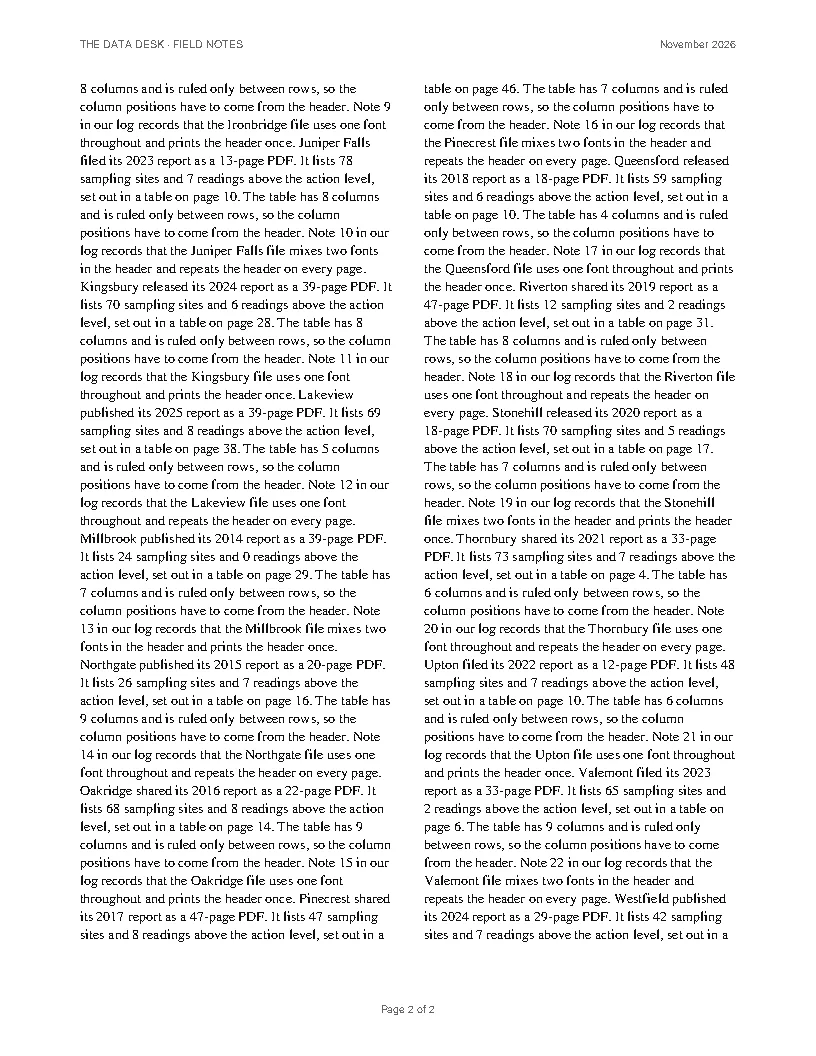
read_columns() works for any number of columns: three columns produce two gutters and three crops. Always crop away headers and footers first (how): a running header that spans the page fills the gutter and hides it.
Checked against the text the sample PDF was generated from:
import json
import re
from pathlib import Path
import pdfplumber

normalize = lambda s: re.sub(r"\s+", " ", s).strip()

with pdfplumber.open("samples/two-column.pdf") as pdf:
    page = pdf.pages[1]
    body = page.crop((0, 50, page.width, page.height - 45))
    got = [normalize(c) for c in read_columns(body)]

expected = [normalize(c) for c in truth["columns_in_reading_order"][2:]]   # page 2's columns
print("page 2 columns match the source text:", got == expected)page 2 columns match the source text: TrueFull-width titles above the columns
Articles, papers and reports often start with a title or abstract that spans both columns. Detect the gutter where the page has only columns, then treat any characters that fall inside the gutter band as full-width text and split the page just below them:
import pdfplumber

with pdfplumber.open("samples/two-column.pdf") as pdf:
    page = pdf.pages[0]
    body = page.crop((0, 50, page.width, page.height - 45))

    # Find the gutter from the lower part of the page, where only columns are
    lower = body.crop((0, body.bbox[1] + body.height * 0.4, page.width, body.bbox[3]))
    gutter = find_gutters(lower)[0]

    # Characters inside the gutter band belong to full-width text (title, standfirst)
    in_gutter = [c for c in body.chars if c["x0"] < gutter + 8 and c["x1"] > gutter - 8]
    split_y = max(c["bottom"] for c in in_gutter) + 2

    top = body.crop((0, body.bbox[1], page.width, split_y))
    columns = body.crop((0, split_y, page.width, body.bbox[3]))
    print(top.extract_text())
    for col in read_columns(columns):
print("column:", col.splitlines()[0])Reading water-quality reports at scale
How column geometry turns a messy PDF into clean text
column: Municipal water systems publish quality reports every
column: page 2. The table has 8 columns and is ruled onlyThe title and subtitle come out first, then each column in order. The same idea handles a full-width figure caption or table in the middle of a page: find every band of the page where the gutter is crossed, and read the bands from top to bottom, splitting only the ones without crossings.
use_text_flow: sometimes a shortcut
use_text_flow=True ignores positions and keeps the order in which the PDF’s content stream draws the text. Word processors and typesetting systems usually draw one column at a time, so this can give correct reading order with no geometry at all:
import pdfplumber

with pdfplumber.open("samples/two-column.pdf") as pdf:
    page = pdf.pages[1]
    body = page.crop((0, 50, page.width, page.height - 45))
    lines = body.extract_text(use_text_flow=True).splitlines()

# Follows the order in which the PDF draws text: right for this file,
# not guaranteed for every producer.
print(lines[0])
print(lines[-1])8 columns and is ruled only between rows, so the
sites and 7 readings above the action level, set out in aIt worked on this sample because the generator draws the left column first. PDFs from design tools, merged files and edited documents often draw in other orders (headers last, columns interleaved, text boxes in creation order), so check before you rely on it.
Which approach to use
| Layout | Approach |
|---|---|
| Two equal columns, nothing full-width | Split at page.width / 2 |
| Columns of different widths, or three or more | Gutter detection |
| Title, abstract or figures spanning the page | Gutter detection plus full-width bands |
| Word-processor export, consistent producer | Try use_text_flow=True, verify |
| Tagged PDF (accessible export, browser Save as PDF) | Read the structure tree, which stores the intended order |
| Newspapers, magazines, irregular boxes | Crop each text box explicitly, or use a layout model |