Reference
Structure tree (tagged PDFs)
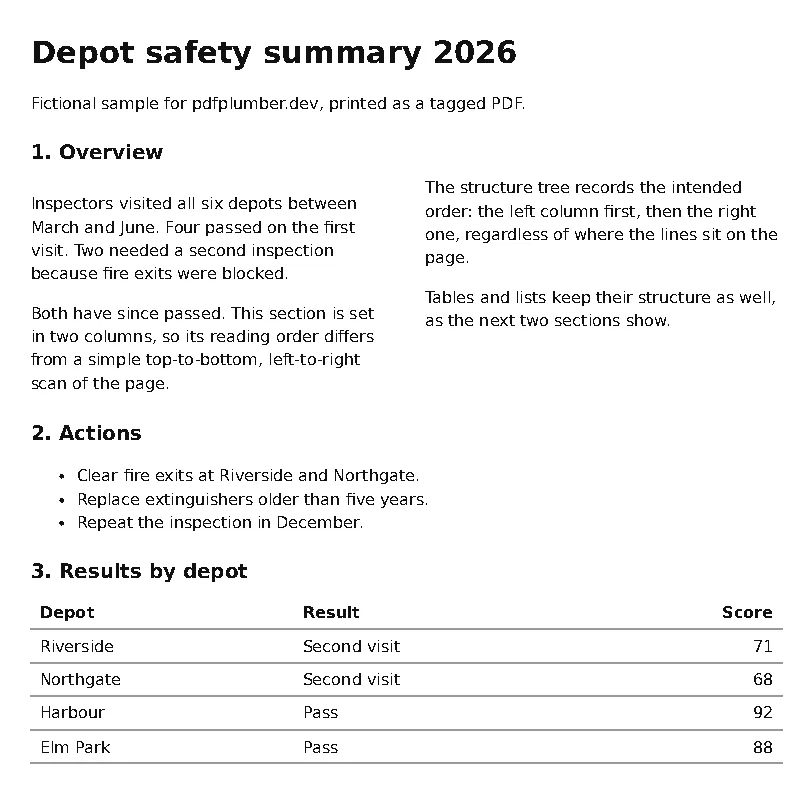
Tagged PDFs carry the document's logical structure (headings, paragraphs, lists, tables and their reading order), written by the authoring tool for screen readers. When a PDF has it, pdfplumber can read it, and it answers questions that geometry can only guess at. We tested it on a tagged PDF printed by Chromium and found two bugs worth knowing about.
Short answer
pdf.structure_tree returns the tagged structure as nested dictionaries. Join each element’s characters (linked by their mcid) and you get the document in its intended order, tables included:
from collections import defaultdict

import pdfplumber
from pdfplumber.utils import extract_text

def chars_by_mcid(page):
    """Characters grouped by marked-content ID. Characters inside a nested span lose their
    ID in pdfplumber 0.11.10, so carry the last ID forward over them (content-stream order)."""
    groups, current = defaultdict(list), None
    for c in page.chars:
        if c["mcid"] is not None:
            current = c["mcid"]
        elif c["tag"] not in (None, "Span"):          # artifacts and other untagged content
            current = None
        groups[c["mcid"] if c["mcid"] is not None else current].append(c)
    return groups

def text_of(node, groups):
    chars = [c for m in node.get("mcids", []) for c in groups[m]]
    own = extract_text(chars).replace("\n", " ") if chars else ""
    return " ".join(t for t in [own, *(text_of(k, groups) for k in node.get("children", []))] if t)

with pdfplumber.open("samples/tagged-report.pdf") as pdf:
    page = pdf.pages[0]
    groups = chars_by_mcid(page)
    elements = pdf.structure_tree[0]["children"]
    plain_lines = page.extract_text().splitlines()

for node in elements[:9]:                                   # the outline, in reading order
    print(f"{node['type']:5} {text_of(node, groups)[:72]}")

table = next(n for n in elements if n["type"] == "Table")
print("\nTable from tags:", [[text_of(cell, groups) for cell in row["children"]] for row in table["children"]][:3])
print("extract_table():", page.extract_table())

print("\nplain extract_text(), line 4:", plain_lines[3][:60])H1 Depot safety summary 2026
P Fictional sample for pdfplumber.dev, printed as a tagged PDF.
H2 1. Overview
P Inspectors visited all six depots between March and June. Four passed on
P Both have since passed. This section is set in two columns, so its readi
P The structure tree records the intended order: the left column first, th
P Tables and lists keep their structure as well, as the next two sections
H2 2. Actions
L Clear fire exits at Riverside and Northgate. Replace extinguishers older
Table from tags: [['Depot', 'Result', 'Score'], ['Riverside', 'Second visit', '71'], ['Northgate', 'Second visit', '68']]
extract_table(): None
plain extract_text(), line 4: The structure tree records the intendedThe sample is tagged-report.pdf. Note the chars_by_mcid() workaround: without it, pdfplumber 0.11.10 loses text after ligatures in this file (details below).
What the tree contains
Each element is a dictionary with:
type: the role, using the PDF standard’s names:Document,H1toH6,P,L(list),LI,Lbl,Table,TR,TH,TD,Figure,Span, and producer-specific ones such asNonStruct.mcidsandpage_number: which marked-content sections on which page belong to the element. Every character, line, rectangle and image carriesmcidandtagkeys that point back here.children: the elements inside it, in reading order.- Optional
attributes,lang,alt_text,actual_text,title,idandrevision: table cell scopes and spans, the language, a figure’s alternative text.
page.structure_tree gives the elements for one page, pdf.structure_tree for the whole document.
Is the PDF tagged?
import pdfplumber

for name in ["tagged-report.pdf", "invoice.pdf", "real/federal-register-2020-17221.pdf"]:
    with pdfplumber.open(f"samples/{name}") as pdf:
        tree = pdf.structure_tree
print(f"{name:38} {'tagged: ' + str(len(tree[0]['children'])) + ' top-level elements' if tree else 'no structure tree'}")tagged-report.pdf tagged: 12 top-level elements
invoice.pdf no structure tree
real/federal-register-2020-17221.pdf no structure treeAn empty list means no tags. Tagged PDFs usually come from word processors with accessibility settings on, from Chromium-based browsers’ Save as PDF, and from publishing systems built for accessibility; scans, many report generators and older files are untagged. Of this site’s other samples, only one is tagged: the Supreme Court transcript page, written by Acrobat Distiller 6.0, whose tree starts with a Div element. Our generated samples and the Federal Register notice are not. Tags are only as good as the tool that wrote them, so check a page before relying on them.
Reading order and tables, without geometry
The two-column section shows what the tree is good for. extract_text() reads straight across both columns, so its fourth line starts with the right column (The structure tree records the intended), while the tree puts the left column’s paragraphs first. The geometric approach gets the same result by finding the gutter, but only the tree knows the order when the layout is irregular.
The table is the other win. Its rows have no vertical lines, so extract_table() with default settings returns None, while the tree lists every row (TR) and cell (TH for headers, TD for data) explicitly, including row and column spans in the cell attributes. For tagged documents, that is the most reliable table extraction there is.
Two bugs in 0.11.10
Text after a nested tag loses its mcid
import itertools

import pdfplumber

with pdfplumber.open("samples/tagged-report.pdf") as pdf:
    page = pdf.pages[0]
    line = next(l for l in page.extract_text_lines() if l["text"].startswith("Clear"))
    chars = [c for c in page.chars if abs(c["top"] - line["top"]) < 1]

print(line["text"])
for (mcid, tag), group in itertools.groupby(chars, key=lambda c: (c["mcid"], c["tag"])):
print(f" mcid={mcid!s:4} tag={tag!s:9} {''.join(c['text'] for c in group)!r}")Clear fire exits at Riverside and Northgate.
mcid=10 tag=NonStruct 'Clear '
mcid=None tag=Span 'fi'
mcid=None tag=None 're exits at Riverside and Northgate.'Chromium wraps each ligature (here fi) in a small Span inside the paragraph’s marked content. pdfplumber tracks only the innermost tag, so when the Span ends it sets mcid to None instead of returning to the paragraph’s 10. Everything after the first ligature on the line drops out of the element. Any producer that nests marked content triggers this; ligatures in browser-printed PDFs are the most common case we know of.
The chars_by_mcid() function in the first example works around it: in content-stream order (the order of page.chars), it carries the last ID forward over characters with no ID, unless they are tagged as something else, such as page artifacts. That is right for this producer; check the text of a few elements against the page before relying on it for others.
–structure crashes the command line
pdfplumber samples/tagged-report.pdf --structure 2>&1 | tail -1
pdfplumber samples/tagged-report.pdf --structure-text 2>&1 | tail -1TypeError: Object of type bytes is not JSON serializable
TypeError: Object of type bytes is not JSON serializableBoth structure options of the pdfplumber command fail on this file, because some attribute values (here each table cell’s Headers list) are bytes, which json cannot write. The Python API is not affected. To save the tree as JSON yourself, convert bytes on the way out:
import json

import pdfplumber

with pdfplumber.open("samples/tagged-report.pdf") as pdf:
    tree = pdf.structure_tree

def plain(value):
    """Some attribute values arrive as bytes (here, table header IDs); JSON needs text."""
    return value.decode("utf-8", "replace") if isinstance(value, bytes) else str(value)

with open("structure.json", "w", encoding="utf-8") as f:
    json.dump(tree, f, default=plain, ensure_ascii=False, indent=1)

cell = tree[0]["children"][10]["children"][1]["children"][0]
print(cell["type"], cell["attributes"])
print("structure.json:", len(open("structure.json", encoding="utf-8").read()), "characters")TD {'O': 'Table', 'Headers': [b'node00000025'], 'RowSpan': 1, 'ColSpan': 1}
structure.json: 8422 charactersWe found neither problem in the issue tracker when we checked (4 November 2026). Upstream, a pull request about structure elements, #1379, was open at the same time; it addresses inline structure elements, not these two issues.