Reference
The pdfplumber command
Installing pdfplumber also installs a pdfplumber command. It dumps a PDF's objects as CSV or JSON, or its text, without writing any Python. Every example below was run with pdfplumber 0.11.10, and the screenshots are of a real terminal.
Short answer
pdfplumber file.pdf writes every character, line and rectangle as CSV. --format json and --format text change the output; --pages, --types and --include-attrs narrow it.
Options
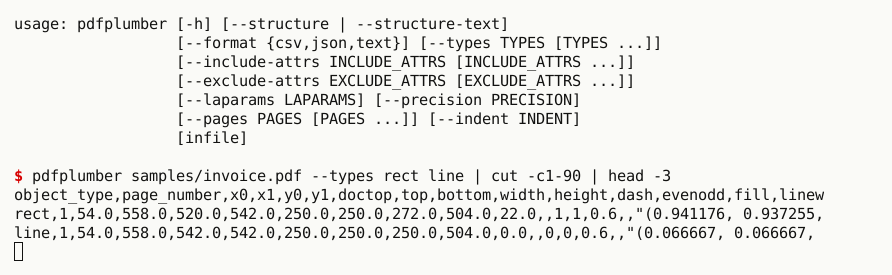
| Option | Default | Effect |
|---|---|---|
infile |
The PDF. - reads standard input, which must be seekable (see below) |
|
--format csv|json|text |
csv |
Objects as CSV or JSON, or each page’s text |
--types char rect … |
all | Object types to include: char, line, rect, curve, image, annot, and with --laparams the layout objects |
--include-attrs … |
all | Keep only these attributes (plus object_type) |
--exclude-attrs … |
none | Drop these attributes |
--pages 1 3-5 |
all | 1-based page numbers; ranges with a hyphen |
--precision N |
full | Round numbers to N decimal places |
--laparams '{…}' |
off | Run pdfminer.six’s layout analysis with these parameters (JSON) |
--indent N |
none | Pretty-print JSON |
--structure, --structure-text |
Print the document’s structure tree as JSON (tagged PDFs) |
There is no option for tables or for text without layout padding; those need Python.
CSV: one row per object
pdfplumber samples/invoice.pdf --types char --include-attrs text fontname size | head -6
echo "..."
pdfplumber samples/invoice.pdf | cut -d, -f1 | sort | uniq -c # every object type, countedobject_type,fontname,size,text
char,Helvetica-Bold,20.0,H
char,Helvetica-Bold,20.0,o
char,Helvetica-Bold,20.0,l
char,Helvetica-Bold,20.0,l
char,Helvetica-Bold,20.0,o
...
851 char
15 line
1 object_type
1 rectThe first command keeps three attributes of each character; the second counts the object types on the page. CSV columns are the union of the attributes of all included types, so mixing types gives many empty cells; select one type at a time when you process the output. Every attribute is described in objects.
JSON
pdfplumber samples/invoice.pdf --format json --types rect --precision 1 \
--include-attrs x0 top x1 bottom non_stroking_color --indent 2 | tail -15 "x0": 54.0,
"x1": 558.0,
"non_stroking_color": [
0.9,
0.9,
0.9
],
"object_type": "rect",
"top": 250.0,
"bottom": 272.0
}
]
}
]
}JSON output is nested: document metadata, then a list of pages, each with its objects by type. --precision rounds every number, colours included, which keeps files small and diffs readable. Piping JSON into head makes Python report a BrokenPipeError when head exits early; that is harmless, and tail or a JSON tool such as jq avoids it.
Text
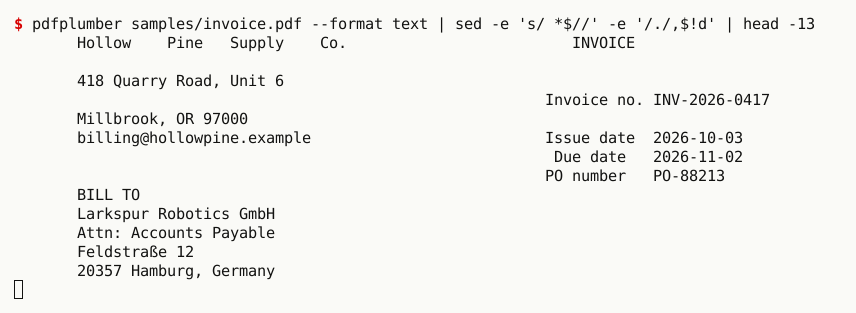
--format text prints each page’s extract_text(layout=True). It keeps columns side by side, as the screenshot shows, but it also pads: there are blank lines at the top, long runs of spaces, and a large heading such as Hollow Pine Supply Co. is spread out to keep its width (Hollow Pine Supply Co.). There is no separator between pages. For plain text without padding, one line of Python does it: python -c "import pdfplumber,sys; [print(p.extract_text()) for p in pdfplumber.open(sys.argv[1]).pages]" file.pdf.
pdfplumber samples/invoice.pdf --format text | sed -e 's/ *$//' -e '/./,$!d' | head -10 Hollow Pine Supply Co. INVOICE
418 Quarry Road, Unit 6
Invoice no. INV-2026-0417
Millbrook, OR 97000
billing@hollowpine.example Issue date 2026-10-03
Due date 2026-11-02
PO number PO-88213
BILL TO
Larkspur Robotics GmbHPages
# pages 2 to 3 only (1-based, ranges allowed): characters per page
pdfplumber samples/bank-statement.pdf --pages 2-3 --types char --include-attrs page_number \
| cut -d, -f2 | sort | uniq -c 1140 2
801 3
1 page_numberPage numbers start at 1, as in a PDF viewer; 2-3 includes both ends. Only the selected pages are parsed, but pdfplumber still reads the whole page tree, so very long documents take a moment even for one page.
Standard input
pdfplumber - < samples/invoice.pdf --types rect --include-attrs x0 top width height    # redirect: works
cat samples/invoice.pdf | pdfplumber - --types rect 2>&1 | tail -1 # pipe: failsobject_type,x0,top,width,height
rect,54.0,250.0,504.0,22.0
pdfplumber.utils.exceptions.PdfminerException: File or stream is not seekable.- reads the PDF from standard input, but only if it is seekable: a redirected file (< file.pdf) is, a pipe is not. PDF parsing jumps back and forth in the file, starting from the cross-reference table at its end. To process a download, save it to a file first, or use Python and io.BytesIO (URLs and S3). With options but no file at all, as in cat file.pdf | pdfplumber --format text, it fails with an unhelpful 'NoneType' object has no attribute 'seek'; with no arguments, it prints its help.
Layout analysis
# pdfminer.six layout analysis adds text boxes and lines as objects
pdfplumber samples/two-column.pdf --pages 1 --laparams '{}' --types textboxhorizontal \
--include-attrs x0 top text --precision 0 | head -8object_type,x0,top,text
textboxhorizontal,60.0,30.0,"THE DATA DESK · FIELD NOTES
"
textboxhorizontal,495.0,30.0,"November 2026
"
textboxhorizontal,60.0,66.0,"Reading water-quality reports at scale
How column geometry turns a messy PDF into clean text
"--laparams takes a JSON object of pdfminer.six’s LAParams; '{}' uses the defaults. The output then also contains pdfminer’s text boxes and text lines, with their text, which follows the columns on a two-column page (why that matters).
Structure tree
--structure and --structure-text print the logical structure of a tagged PDF (headings, paragraphs, tables and their reading order, as recorded by the authoring tool) as JSON, with or without the text of each element. Untagged PDFs have no structure tree. In 0.11.10 both options can crash on tagged files whose attributes contain bytes, as on our tagged sample:
pdfplumber samples/tagged-report.pdf --structure 2>&1 | tail -1
pdfplumber samples/tagged-report.pdf --structure-text 2>&1 | tail -1TypeError: Object of type bytes is not JSON serializable
TypeError: Object of type bytes is not JSON serializableThe Python API reads the same tree without problems; the structure tree guide shows how to save it as JSON.